GGUF is the single-file model format read by llama.cpp, Ollama and LM Studio. The Q4_K_M, Q5_K_M or Q8_0 in the name is the quantization: how many bits each weight keeps. Q4_K_M is the usual choice: in our test it weighed 59 % of Q8_0 and picked the same next token as the original 89 % of the time.
On 18 November 2026 we downloaded the official GGUF files of Qwen2.5 1.5B Instruct in 6 versions (from F16 down to Q3_K_M) and put them through llama.cpp (build b12500) on a Linux server with no GPU, an AMD Ryzen 7 7730U processor using 8 threads. We measured what each file weighs, how fast it writes and how often its next-token choice differs from the unquantized model’s. Then we ran the 28 models of our Model Finder through the same engine the tool uses, to see what fits in 8, 12, 16, 24 and 32 GB at each level. Everything below is labelled with where it comes from.
What GGUF is, and what Q4_K_M means in the file name
A GGUF file carries everything a model needs to run in a single piece: the weights, the tokenizer, the architecture and usually the chat template. That’s why you can download one file and open it straight away in llama.cpp, LM Studio or Ollama. The format was born in the llama.cpp project, and those 3 programs read it because they build on llama.cpp and its ggml library.
 llama.cppRuntime sheet
Quantization is the compression. An unquantized model stores each weight in 16 or 32 bits; a quantized file stores it in fewer, in blocks that share a scale. The name tells you how:
- The number (Q3, Q4, Q5, Q6, Q8) is the base bits per weight.
- The K marks the “k-quants” family, which works in blocks grouped into super-blocks. Q8_0 and Q4_0 are the older, simpler family.
- The _S, _M or _L is the mix: small, medium or large. It isn’t the size of the model, it’s how many tensors get kept at a higher precision.
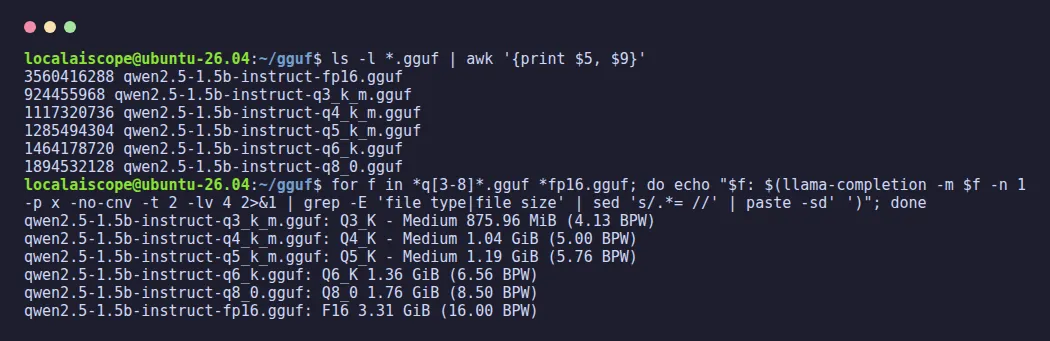
We checked that last point by opening the files. Our Q4_K_M has 169 tensors at 4 bits (q4_K) and 29 at 6 bits (q6_K); Q5_K_M has the same 169/29 split with 5 bits as the base; Q6_K and Q8_0 use a single type for all 198 quantized tensors. So when you choose Q4_K_M, you’re not choosing “everything at 4 bits”: you’re choosing 4 bits with the most delicate parts protected. That’s also why llama.cpp reports 5.00 bits per weight for this Q4_K_M rather than 4.
If you’re weighing GGUF against the original safetensors files, which are what vLLM and transformers load, that comparison lives in our guide vLLM vs Ollama, and on a Mac, in MLX vs GGUF.
GGUF quantization levels: how much each one weighs
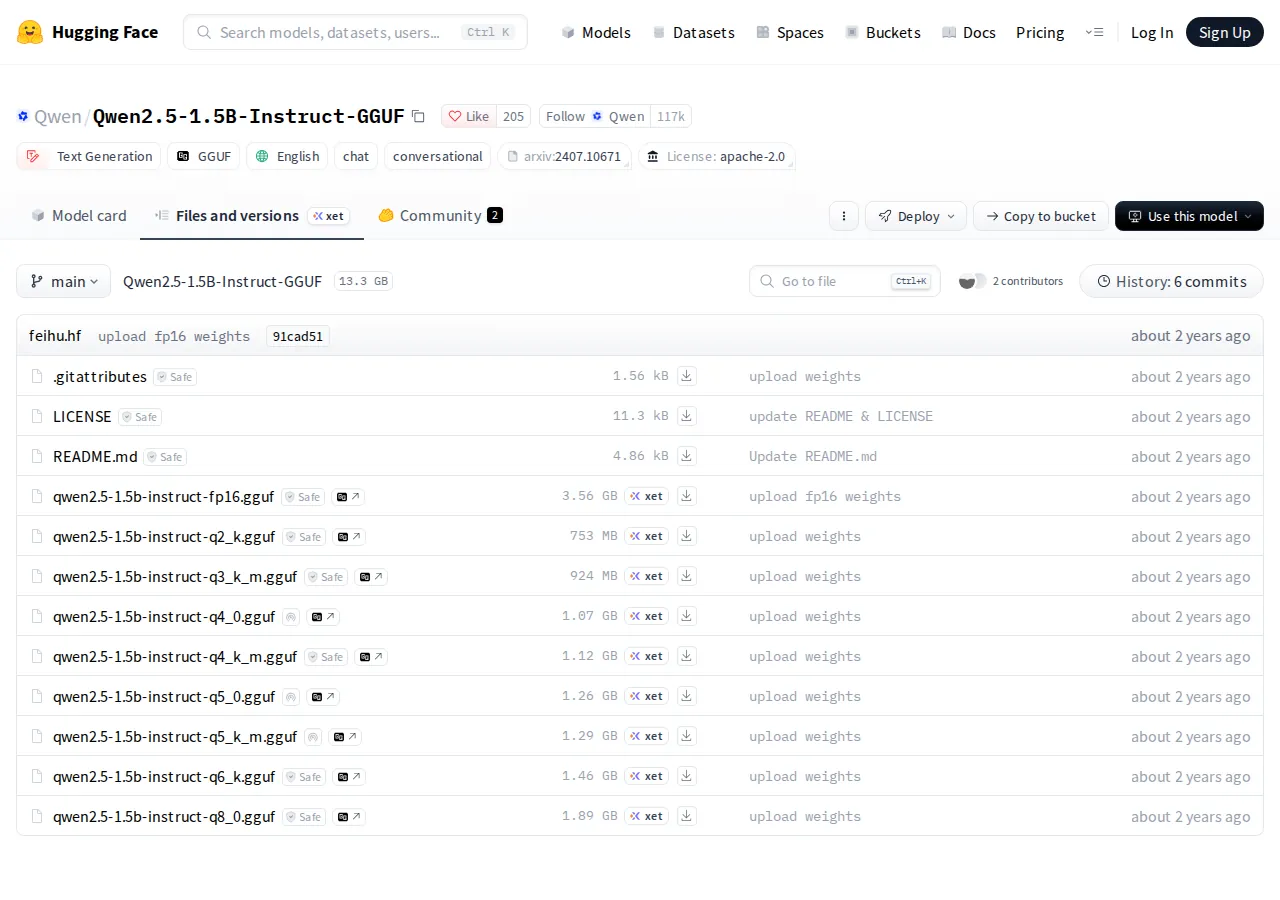
The rule of thumb works: fewer bits, smaller file. But it doesn’t fall in a straight line, because of the protected tensors and the parts that are never compressed. These are the 6 files we measured, all from Qwen’s official repository:
| Level | File (MB) |
Bits per weight |
vs Q8_0 |
|---|---|---|---|
| F16 | 3,560 | 16.00 | 188 % |
| Q8_0 | 1,895 | 8.50 | 100 % |
| Q6_K | 1,464 | 6.56 | 77 % |
| Q5_K_M | 1,285 | 5.76 | 68 % |
| Q4_K_M | 1,117 | 5.00 | 59 % |
| Q3_K_M | 924 | 4.13 | 49 % |
This model is small, and its vocabulary alone has 151,936 tokens: that probably explains why its levels sit so close together. In bigger models the ladder opens up: across the models in our catalogue that publish both files, Q4_K_M weighs 62 % of Q8_0 on average, Q5_K_M 72 % and Q6_K 82 %. For Qwen3 8B, that’s 8.11 GiB at Q8_0, 6.26 at Q6_K, 5.45 at Q5_K_M, 4.68 at Q4_K_M and 3.84 at Q3_K_M.
Q4_K_M vs Q5_K_M vs Q8_0: how much quality you lose
How do you measure what a compressed file loses? With the method built into llama.cpp. First, the F16 model read 10,240 tokens of English Wikipedia text (the wikitext-2 test set, 20 blocks of 512 tokens) and we saved, at every position, how likely it found each possible next token. Then each quantized file read exactly the same text and llama-perplexity compared them. Two figures matter: how often the quantized model’s favourite next token is the same as the original’s, and how much its perplexity (PPL) rises (how surprised it is by the real text; lower is better).
| Level | Same first choice (%) |
PPL vs F16 (%) |
Mean KLD |
|---|---|---|---|
| Q8_0 | 97.7 | +0.3 | 0.0015 |
| Q6_K | 93.6 | +1.2 | 0.011 |
| Q5_K_M | 91.8 | +1.2 | 0.017 |
| Q4_K_M | 89.0 | +5.6 | 0.042 |
| Q3_K_M | 82.2 | +13.4 | 0.117 |
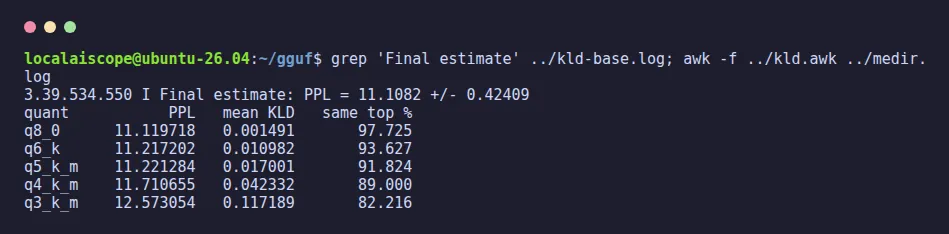
Q8_0 is practically indistinguishable from the original: the same first choice in 97.7 % of tokens and 0.3 % more perplexity. Q6_K and Q5_K_M cost about the same in perplexity (+1.2 %), although Q5_K_M strays a little more often in its first choice. Q4_K_M is the first real step: +5.6 % perplexity and a different first choice in about 1 token in 9. That doesn’t mean 1 wrong word in 9: a different first choice isn’t necessarily a wrong one. Q3_K_M is where it starts to hurt: more than twice the perplexity loss of Q4_K_M and almost 3 times its divergence (the KLD column).
One honest limit: this is 1 model of 1.5 billion parameters, measured on 1 English text. We haven’t measured bigger models this way, so we won’t put a figure on them.
Speed: the smaller file also writes faster
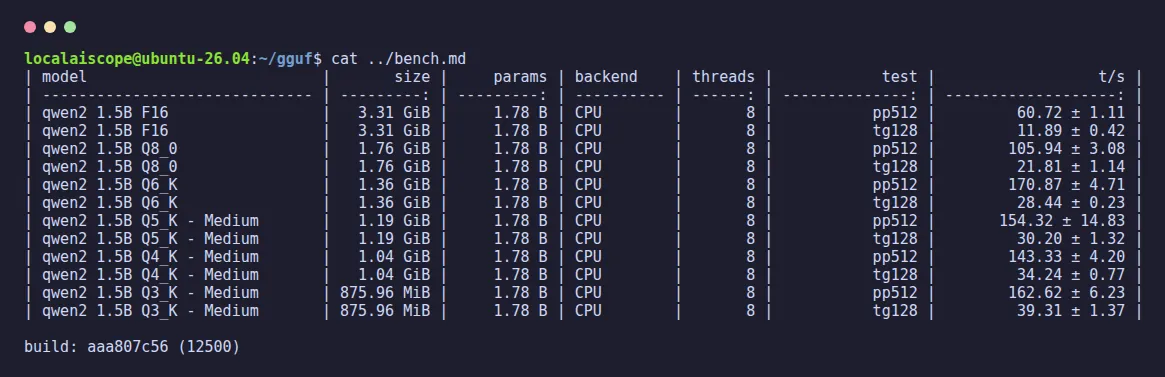
On a computer without a GPU, writing each token means reading the whole model from memory, so a smaller file means more tokens per second. Our benchmark with llama-bench (128 tokens written and a 512-token prompt read, 3 repetitions, 8 threads) confirms it. For once, going on a diet makes you faster:
| CPU 18 Nov 2026 |
Writes (tok/s) |
Reads (tok/s) |
|---|---|---|
| F16 | 11.9 | 61 |
| Q8_0 | 21.8 | 106 |
| Q6_K | 28.4 | 171 |
| Q5_K_M | 30.2 | 154 |
| Q4_K_M | 34.2 | 143 |
| Q3_K_M | 39.3 | 163 |
Writing speed climbs neatly as the file shrinks: Q4_K_M writes 57 % faster than Q8_0 on the same processor. Reading the prompt doesn’t follow the same order: there the work is mostly arithmetic rather than memory, so it depends on how each format is unpacked on this CPU. One caveat: the server had other work running at the same time, so small gaps such as Q6_K against Q5_K_M are within the noise. We didn’t measure on a graphics card.
What fits in 8, 12, 16, 24 and 32 GB with each quantization
This is where quantization pays for itself. We counted, with the same calculation our Model Finder uses (weights + the model’s real KV cache + a margin for the runtime, with an 8,192-token context), how many of our 28 models fit in each memory, depending on the level you download:
| Memory | Q8_0 | Q5_K |
Q4_K |
Q3_K |
|---|---|---|---|---|
| 8 GB | 3 | 5 | 7 | 8 |
| 12 GB | 7 | 8 | 9 | 9 |
| 16 GB | 9 | 10 | 10 | 12 |
| 24 GB | 10 | 16 | 18 | 18 |
| 32 GB | 14 | 18 | 20 | 18 |
The machines are the ones in our catalogue: a PC with an RTX 4060 (8 GB), one with an RTX 3060 (12 GB), a Mac with M4 (16 GB), a workstation with an RTX 4090 (24 GB) and a Mac mini with M6 (32 GB). Q6_K, left out of the table for space, sits in between: 3, 8, 9, 14 and 17 models. How to read it: with 8 GB of VRAM, going from Q8_0 to Q4_K_M takes you from 3 models to 7. With 24 GB, from 10 to 18. The Q3_K_M column doesn’t always grow because not every model publishes that level: 23 of our 28 have it, against 26 with Q4_K_M. The memory counted is what’s left for the model: 0.8 GiB less on a graphics card for the desktop, 3 GiB less on a Mac or in system RAM for the operating system. One more detail: the Q3_K_M column counts what fits, but the Model Finder shows anything below Q4_K_M separately rather than counting it.
A concrete example: Qwen3 8B needs 9.99 GiB at Q8_0 with that context, which doesn’t fit on the RTX 4060 (7.2 GiB available), and 6.56 GiB at Q4_K_M, which does. The context costs memory too, and if you’re short, our guide to context length shows how much each step costs.
How to download a specific quantization
On Hugging Face, the official repositories usually hold one file per level, and the 3 big programs let you choose:
- llama.cpp: the level goes after a colon.
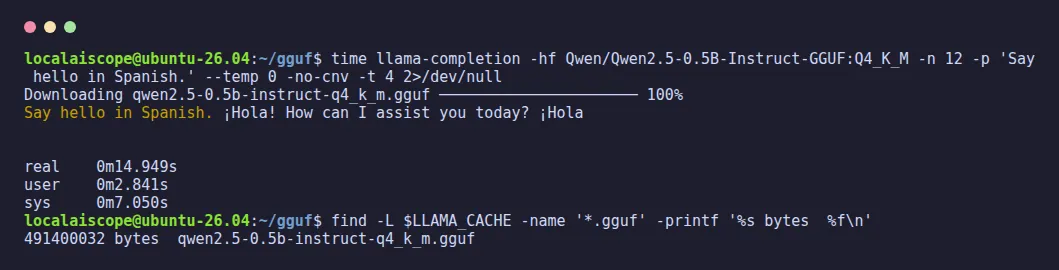
llama-completion -hf Qwen/Qwen2.5-0.5B-Instruct-GGUF:Q4_K_Mdownloaded the 491,400,032-byte file and answered in 14.9 seconds, download included, in our test, even though the file name is written in lower case. Asked to say hello in Spanish, it replied “¡Hola!” and then, unprompted, switched to English to offer its help: bilingual, if not very obedient. llama-server takes the same-hfoption. - Ollama: with a Hugging Face model, the same pattern:
ollama run hf.co/user/repository:Q4_K_M(a route we didn’t test this time). To load a GGUF you already have on disk,FROM ./model.ggufin a Modelfile, as we explain in our Ollama commands guide. - LM Studio: when you download a model, it lists the repository’s files with their size and you pick one (we didn’t test it this time). If it complains with “no LM runtime found for model format ‘gguf'”, the fix is in LM Studio not working.
Opens on YouTube (no cookies) only when you press play.
A 12-minute walk through the Q8, Q6, Q5 and Q4 ladder, published in October 2025.
Which GGUF quantization to download
- The model fits with room to spare: Q5_K_M or Q6_K. You lose almost nothing against Q8_0 and you keep memory for the context.
- The usual case: Q4_K_M. It’s the level our Model Finder takes as its reference, the one that turns 3 models into 7 on an 8 GB card, and in our measurement it made the same first choice as the original in 89 % of tokens.
- Memory to burn, or you’re measuring: Q8_0, which is practically the original model at half the size of F16.
- It doesn’t fit at Q4_K_M: before dropping to Q3_K_M, try a smaller model of the same family at Q4_K_M or higher. Below Q4_K_M, our Model Finder shows the model separately instead of counting it as one that fits.
If you’d rather not do the sums yourself, the Model Finder does them for your machine, model by model, with the same numbers as this page.