Ollama v0.40.16 gives a model 4,096 tokens of context if it finds less than 23 GiB of graphics memory, 32,768 from 23 GiB and 262,144 from 47 GiB. You change it with OLLAMA_CONTEXT_LENGTH, /set parameter num_ctx or num_ctx; in LM Studio, when you load the model; in llama.cpp, with -c. And every token costs memory.
How much memory? We worked it out. On 5 November 2026 we read the code and official documentation of the 3 stable versions (Ollama v0.40.14, LM Studio 0.4.28 and llama.cpp v0.9.0; on 7 November we checked that Ollama v0.40.15 keeps the same context code and documentation, and on 10 November that v0.40.16 does too) and ran 6 models from our catalogue through the same engine that powers our Model Finder: how much the context cache weighs at 4k, 8k, 32k, 128k and at each model’s maximum, and on how many of our 18 computers each combination fits. Spoiler: on a small model, the full context can weigh 15 times more than the model itself.
 OllamaRuntime sheet
 LM StudioRuntime sheet
 llama.cppRuntime sheet
What context length is, and why it eats memory
The context is everything the model can see at once: your instructions, the conversation so far, the document you pasted and the answer it is writing. It is counted in tokens, chunks of a word: in our own measurements with the Qwen3 8B tokenizer, a contract in English takes 1.12 tokens per word.
To avoid re-reading all of it for every new token, the runtime keeps a cache, the KV cache (K and V are the 2 halves it stores for every token, in every layer). That cache is reserved when the model loads, for the full context you asked for, whether you use it or not. Its size follows from the model’s design: layers × KV heads × head size × 2 halves × bytes per value. For Qwen3 8B that is 36 layers × 8 heads × 128 × 2 × 2 bytes: 144 KiB per token. Multiply by 40,960 tokens and you get 5.6 GiB, more than the 4.7 GiB the model itself weighs in Q4_K_M.
How much memory each context costs: 6 models
We picked models people really run: 2 small Qwen3, Phi-4, Gemma 4 12B, gpt-oss-20b (a mixture-of-experts, MoE, model) and Qwen3.6 27B. The table gives the memory the cache adds, in GiB, at the default f16 precision, and the last column says on how many of the 18 computers in our Model Finder the model fits at its maximum context, with the Q4_K_M file. Same numbers as the tool, because it does the same calculation.
| Model (maximum context) | 4k | 8k | 32k | 128k | At its maximum | Fits at its maximum |
|---|---|---|---|---|---|---|
| Qwen3 4B 2507 (262,144) | 0.6 | 1.1 | 4.5 | 18.0 | 36.0 | 8 of 18 |
| Qwen3 8B (40,960) | 0.6 | 1.1 | 4.5 | — | 5.6 | 15 of 18 |
| Phi-4 (16,384) | 0.8 | 1.6 | — | — | 3.1 | 15 of 18 |
| Gemma 4 12B (262,144) | 0.4 | 0.4 | 0.8 | 2.3 | 4.3 | 12 of 18 |
| gpt-oss-20b (131,072) | 0.1 | 0.2 | 0.8 | 3.0 | 3.0 | 12 of 18 |
| Qwen3.6 27B (262,144) | 0.3 | 0.5 | 2.0 | 8.0 | 16.0 | 8 of 18 |
Look at the rows that do not grow like the others. Gemma 4 12B uses a sliding window of 1,024 tokens in 40 of its 48 layers, so only 8 layers keep the whole conversation: 4.3 GiB at 262,144 tokens. gpt-oss-20b does the same with a 128-token window in half its layers: 3.0 GiB at 131,072. Qwen3.6 27B keeps a fixed-size state in 48 of its 64 layers, and only 16 grow with the context. Qwen3 and Phi-4, on the other hand, store every token in every layer, and that is where the context hurts. Counting every layer of gpt-oss-20b and Qwen3.6 27B as a full one, gpt-oss-20b would ask for 6.0 GiB at 131,072 instead of 3.0, and Qwen3.6 27B 64 GiB instead of 16; our engine reads each model’s layer pattern.
2 cases worth knowing. Qwen3 8B at its full 40,960 tokens does not fit on a 12 GB RTX 3060 or RTX 4070: it needs 11.7 GiB with the buffers and those cards leave 11.2. At 32,768 it fits, with 10.4. Phi-4 at its 16,384 needs 12.5 GiB and misses the same 2 cards. Quantising the cache, further down, rescues both.
Ollama: 4k, 32k or 256k depending on your graphics memory
Ollama chooses the context for you when the server starts. In server/routes.go of v0.40.16 (lines 2579 to 2584), it adds up the memory of the graphics cards it detects and picks 262,144 tokens from 47 GiB, 32,768 from 23 GiB and 4,096 below that (with no graphics card detected, the total is 0). The server log says what it chose, on a line with the message vram-based default context. On a 12 GB RTX 3060 you get 4,096; on a 24 GB RTX 4090, 32,768; with 2 RTX 3090, 262,144.
4 ways to change it, from the broadest to the most specific (Ollama v0.40.16 documentation, docs/faq.mdx, docs/modelfile.mdx and docs/context-length.mdx):
- For every model: start the server with
OLLAMA_CONTEXT_LENGTH=8192 ollama serve(envconfig/config.go, line 230). The desktop app has a slider for it in its settings. - In a chat with
ollama run: type/set parameter num_ctx 8192(cmd/interactive.go, line 109). - For one model, permanently: a Modelfile with
PARAMETER num_ctx 8192, thenollama create. - From your code:
"options": {"num_ctx": 8192}in the request to/api/generateor/api/chat.
Then check it with ollama ps: the CONTEXT column shows what was actually loaded, and PROCESSOR tells you whether everything stayed on the graphics card. 3 details from the code that explain odd results. If you ask for more than the model was trained with, Ollama trims it to that maximum (llm/server.go, lines 111 to 113). If the context was Ollama’s own choice and the model does not fit when loading, it retries once, one step down: to 32,768 if it was above that, or to 4,096 if it was between 4,097 and 32,768; at 4,096 it does not retry (server/sched.go, lines 694 to 697, 811 to 813 and 953 to 962); if you set it yourself, it does not step down for you. And OLLAMA_NUM_PARALLEL (1 by default) multiplies the context, and the cache, by the number of requests it can serve at once.
Opens on YouTube (no cookies) only when you press play.
This short video goes through 4 ways to check whether Ollama is running a model on your graphics card or on the processor. It is the check to do after raising num_ctx: if PROCESSOR stops saying 100% GPU, the context you asked for pushed part of the model out of the card.

LM Studio: the context is chosen when the model loads
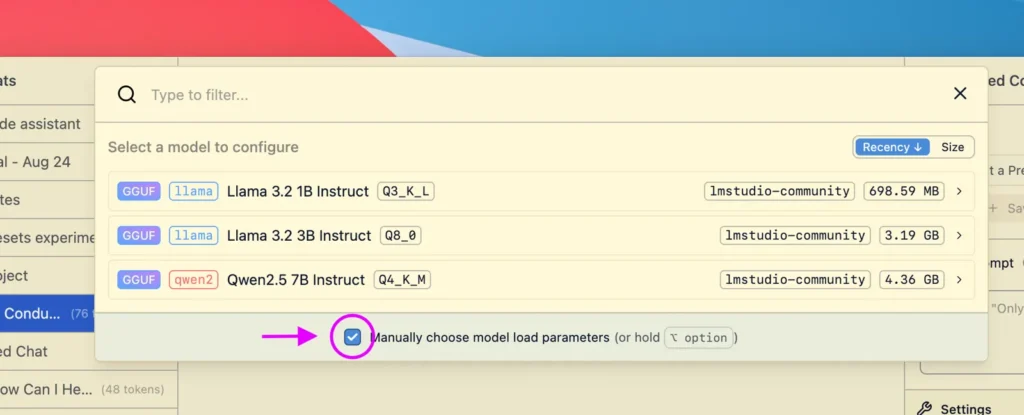
In LM Studio 0.4.28 (the stable version on 5 November 2026), context length is a load setting, not a chat setting. In the model picker, tick “Manually choose model load parameters” and the load settings, context length among them, appear before the model loads; you can also save them as that model’s defaults, together with GPU offload and Flash Attention.
From the terminal, its lms command does the same (LM Studio documentation, lmstudio.ai/docs/cli/local-models/load): lms load <model_key> --context-length 16384 (in the code of lms, also -c 16384). Add --estimate-only and it prints the memory it would need, counting that context, without loading anything: a free way to try 32k before committing. Leave out --context-length and the default saved for that model is used. From code, the REST API takes context_length in POST /api/v1/models/load.
llama.cpp: -c, and a default that is the model’s own maximum
llama.cpp v0.9.0 is the one that asks for most by default. In common/arg.cpp (line 1590), -c, --ctx-size is 0 unless you set it, and 0 means the context the model was trained with: 40,960 for Qwen3 8B, 262,144 for Gemma 4 12B. What saves you is --fit, on by default (common/common.h, line 485): if that context does not fit in memory, it shrinks it, but never below 4,096 tokens (line 487, adjustable with --fit-ctx). If you type -c 0 yourself, it stops trimming and tries the full maximum.
So, in practice: llama-server -m model.gguf -c 16384 and you know exactly what you are paying for. With llama-server there is one more detail: by default it opens 4 slots that share a single cache the size of -c (tools/server/server.cpp, lines 127 to 130), so 4 long conversations at once share those tokens.
The lever: quantise the cache to q8_0 or q4_0
The cache is stored in f16 by default, 2 bytes per value. The 3 runtimes can store it in fewer bytes: q8_0 uses 34 bytes for every 32 values (53 % of f16) and q4_0 uses 18 (28 %). Our engine, with those exact sizes:
- Qwen3 8B at 40,960 tokens: the cache goes from 5.6 to 3.0 GiB with q8_0, and the model now fits on the 12 GB RTX 3060 and RTX 4070 (9.0 GiB in total): from 15 to 17 of our 18 computers.
- Phi-4 at 16,384: from 3.1 to 1.7 GiB with q8_0, and it also fits on those 2 cards: 17 of 18.
- Qwen3 4B 2507 at 262,144: from 36.0 to 10.1 GiB with q4_0, and from 8 to 12 computers (the RTX 4090, the 24 GB Mac with M4 Pro and both 32 GB machines join in).
How to turn it on. In Ollama, OLLAMA_KV_CACHE_TYPE=q8_0 when starting the server; it applies to every model and only works with Flash Attention, which Ollama switches on by itself when your hardware supports it. In llama.cpp, -ctk q8_0 -ctv q8_0 (--cache-type-k and --cache-type-v, common/arg.cpp lines 2388 and 2401). A quantised V half needs Flash Attention: with -fa on auto, the default, llama.cpp turns it on; with -fa off it refuses to start (src/llama-context.cpp, lines 4331 to 4338). In LM Studio they are load options of its llama.cpp engine, one for K and one for V (llamaKCacheQuantizationType and llamaVCacheQuantizationType in its SDK).
Which context to choose
Start from your task, not from the model’s maximum. A chat with short questions lives happily in 4,096 or 8,192 tokens. Summarising a long report or a contract takes 16,384 to 32,768: a 10,000-word contract is about 11,200 tokens for Qwen3 8B in English, 15,400 in Spanish, 15,000 in French and 22,700 in German, measured with its tokenizer on our own texts. Coding tools and agents that read whole files want 64,000 or more, which is the figure Ollama’s documentation gives for them.
If Ollama is new to you, our guide to running Ollama locally starts from the beginning, and if a model loads and then crawls, Ollama not working has the fixes. For the other 2, see how to run LM Studio locally and how to run llama.cpp locally. And to call Ollama from your own code, our guide to the Ollama API covers its routes, its OpenAI-compatible layer and keep_alive.