The Ollama commands you’ll use every day are ollama pull (download a model), ollama list (see what you have), ollama run (chat), ollama ps and ollama stop (what’s in memory), ollama rm (delete), ollama cp and ollama create (copies and custom models from a Modelfile). Below, each one with the real output.
We ran every command in this cheat sheet on 14 November 2026 with Ollama 0.40.16, the latest stable release on that date, in Docker with the official ollama/ollama:0.40.16 image, on a server with no GPU (an AMD Ryzen 7 7730U processor). For the test model we picked one of the smallest in the catalogue, smollm2:135m, so every command answers in seconds. The output blocks are copied straight from our terminal, errors included: when you see one of those messages on your screen, you’ll know exactly where you are.
 OllamaRuntime sheet
All the Ollama commands in one table
ollama --help in v0.40.16 lists 15 commands, as of 14 November 2026. These are the ones that matter for running models at home:
| Command | What it does | Example |
|---|---|---|
pull |
Downloads a model from the catalogue | ollama pull smollm2:135m |
list |
Lists the models you’ve downloaded | ollama list |
run |
Loads a model and chats with it | ollama run smollm2:135m |
ps |
Shows the models loaded in memory | ollama ps |
stop |
Unloads a model from memory | ollama stop smollm2:135m |
show |
Shows a model’s details and Modelfile | ollama show smollm2:135m --modelfile |
create |
Builds a model from a Modelfile | ollama create pirate -f Modelfile |
cp |
Copies a model under another name | ollama cp smollm2:135m my-smollm2 |
rm |
Deletes a model | ollama rm my-smollm2 |
serve |
Starts the Ollama server | ollama serve |
The rest are push (upload a model to a registry), signin and signout (your ollama.com account), launch (Ollama’s menu and integrations) and help. Add -v and you get the version: ollama version is 0.40.16. And if Ollama isn’t installed yet, our guide to run Ollama locally gets you there in a few minutes.
ollama pull and ollama list: download models and see what you have
ollama pull downloads a model by name and tag (the part after the colon). On 14 November 2026, with v0.40.16, our 270 MB model came down in 9.1 seconds, with the progress bar peaking at 60 MB/s; running the same pull again took 0.8 seconds, because the model was already there: it only checked the digest, rewrote the manifest and printed removing unused layers.
$ ollama list
NAME            ID              SIZE      MODIFIED
smollm2:135m    9077fe9d2ae1    270 MB    1 second ago
ollama list has four columns in v0.40.16 (14 November 2026): name, ID, size and when it was modified. The ID is the start of the model manifest’s digest, which is why two names sharing the same manifest show the same ID (you’ll see it with cp). The size is in decimal megabytes: du -h reported 259M for the models folder (270,902,687 bytes, almost all of it the weights file), simply because du counts in mebibytes. Nothing is missing.
“Error: pull model manifest: file does not exist”
In v0.40.16 (14 November 2026), this is the error for a name that doesn’t exist in the catalogue, and also for a tag that doesn’t exist for a model that does: we got it with modelo-que-no-existe and with smollm2:999m.
$ ollama pull smollm2:999m
Error: pull model manifest: file does not exist
ollama run with a model you haven’t downloaded tries to download it first, so a typo in run gives you exactly the same message. Check the spelling and the tag on the model’s page in the catalogue. The other commands complain differently when the model isn’t there, and it pays to recognise each one:
$ ollama rm no-existe
Error: model 'no-existe' not found
$ ollama stop no-existe
Error: couldn't find model "no-existe" to stop
$ ollama cp no-existe:latest otro
Error: model "no-existe:latest" not found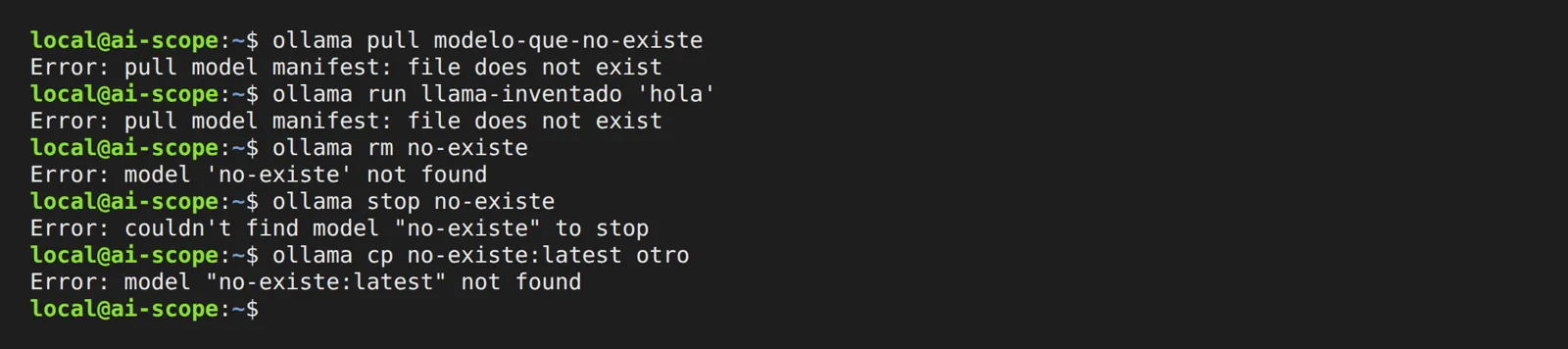
For server, GPU and network messages, our list of Ollama errors with their exact text covers the rest.
ollama run, ps and stop: what’s in memory and how much it takes
ollama run model opens an interactive chat (you leave with /bye), and ollama run model "question" answers once and returns you to the prompt. Add --verbose and it shows the timings. We asked it to say hi in three words:
$ ollama run smollm2:135m "Say hi in 3 words" --verbose
Sammy!
total duration:       846.099538ms
load duration:        779.473469ms
prompt eval count:    36 token(s)
prompt eval duration: 36.411ms
prompt eval rate:     988.71 tokens/s
eval count:           4 token(s)
eval duration:        27.433ms
eval rate:            145.81 tokens/s
One word instead of three, and a name nobody asked for: 135 million parameters have a certain charm. The useful part is in the numbers: of the 846 milliseconds, 779 went on loading the model, and the response came out at 145.81 tokens per second on that CPU alone (v0.40.16, 14 November 2026).
ollama ps shows what stays loaded. In v0.40.16 (14 November 2026) it has seven columns: name, ID, size in memory, processor, context, runner and how long until it’s unloaded.
$ ollama ps
NAME            ID              SIZE      PROCESSOR    CONTEXT    RUNNER      UNTIL
smollm2:135m    9077fe9d2ae1    383 MB    100% CPU     4096       llamacpp    4 minutes from now
“4 minutes from now” comes from the default 5 minutes the model stays loaded after your last message (the OLLAMA_KEEP_ALIVE variable). ollama stop smollm2:135m unloads it on the spot, without deleting anything: ps comes back empty and the model is still in list. If you stop a model that’s downloaded but not loaded, v0.40.16 says nothing and returns no error.
Opens on YouTube (no cookies) only when you press play. More videos on its sheet →
This video goes through a similar path in English: running models from the terminal, adding more models, the HTTP API and, at the end, customising a model.
ollama show and the Modelfile: FROM, PARAMETER num_ctx and SYSTEM
ollama show smollm2:135m gives you the model card: architecture (llama), parameters (134.52M), maximum context (8192), quantization (F16) and capabilities. With --modelfile it prints the full recipe, and with --parameters only the parameters. That recipe is a Modelfile, and you can write your own:
FROM smollm2:135m
PARAMETER num_ctx 8192
PARAMETER temperature 0.2
SYSTEM """You are a pirate. Answer in one short sentence."""
FROM says which model it starts from (a name or a GGUF file), PARAMETER sets options such as the context (num_ctx) or the temperature, and SYSTEM sets the instructions it carries by default. Then:
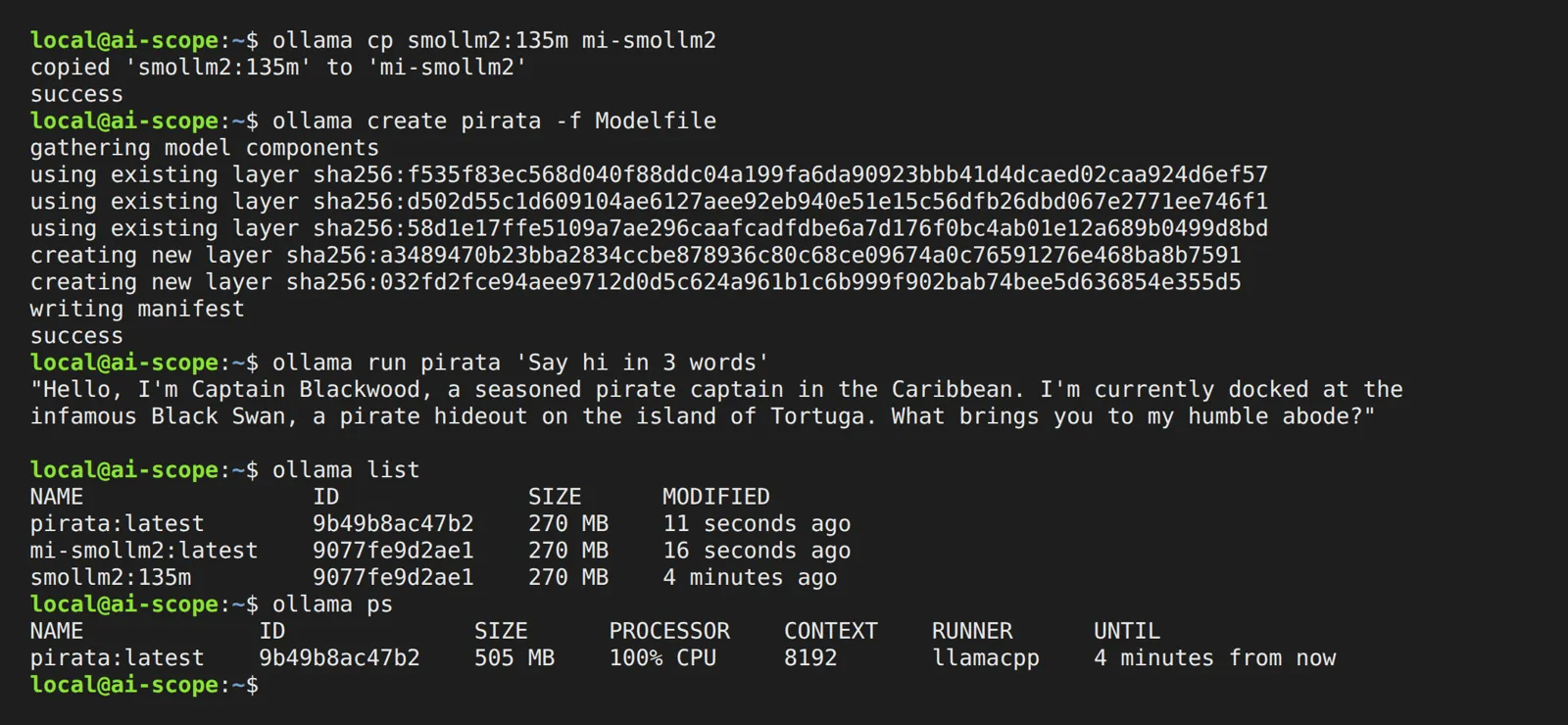
$ ollama create pirata -f Modelfile
gathering model components
using existing layer sha256:f535f83ec568…
using existing layer sha256:d502d55c1d60…
using existing layer sha256:58d1e17ffe51…
creating new layer sha256:a3489470b23b…
creating new layer sha256:032fd2fce94a…
writing manifest
success
(We’ve shortened the digests.) In v0.40.16 it took 0.19 seconds: it reuses the three layers it already had (the weights among them) and only writes the new parts. If the file in the current folder is called Modelfile, ollama create name on its own is enough, without -f; we tried it. Our pirate, by the way, ignored the “one short sentence” rule and introduced himself as Captain Blackwood, docked in Tortuga. The SYSTEM line works; obedience at 135M is another story.
If what you want is just more context, our guide to context length in Ollama explains every way to change it and what it costs in memory.
“Error: unknown parameter”, “command must be one of” and “no FROM line”: a bad Modelfile
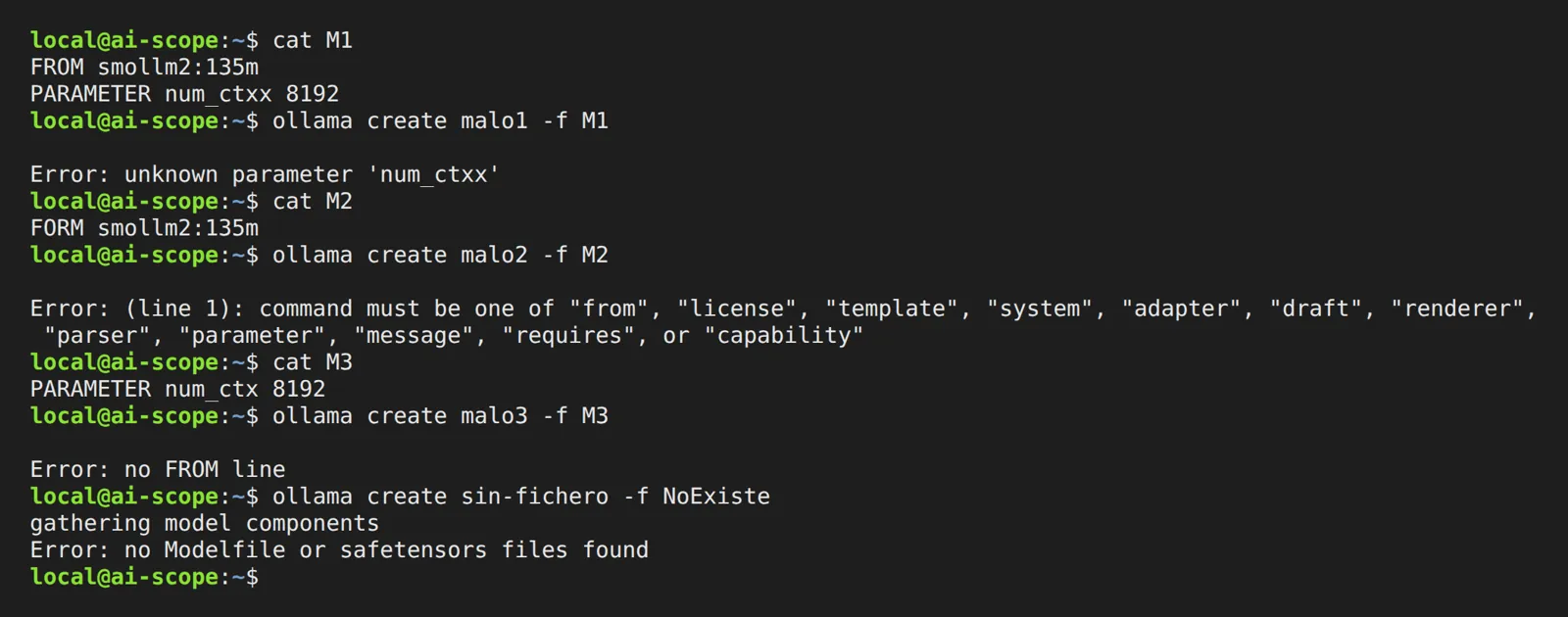
We broke the Modelfile on purpose, one way at a time. These are the exact messages from ollama create in v0.40.16:
| Mistake in the Modelfile | Message |
|---|---|
PARAMETER num_ctxx 8192 (typo in the name) |
Error: unknown parameter 'num_ctxx' |
PARAMETER num_ctx ocho (not a number) |
Error: invalid int value [ocho] |
FORM smollm2:135m (misspelled instruction) |
Error: (line 1): command must be one of "from", "license", "template", "system", "adapter", "draft", "renderer", "parser", "parameter", "message", "requires", or "capability" |
No FROM line |
Error: no FROM line |
FROM no-existe:1b |
Error: pull model manifest: file does not exist |
FROM ./no-hay.gguf (file not there) |
Error: 400 Bad Request: invalid model name |
-f pointing to a file that doesn’t exist |
Error: no Modelfile or safetensors files found |
The trickiest one is the missing GGUF: the message doesn’t say “file not found” but “invalid model name”. Check the path relative to the folder you run create from.
ollama cp and ollama rm: a copy that takes 89 bytes
ollama cp smollm2:135m my-smollm2 took 0.15 seconds, and here comes the good part: the models folder grew by 89 bytes. On 14 November 2026, with Ollama 0.40.16, the copy is a symbolic link to the same manifest, so ollama list shows both names with the same ID and 270 MB each, but the 270 MB are on disk only once.
In our 14 November test with v0.40.16, ollama rm accepted several names at once (ollama rm pirata desde-gguf deleted both) and freed a file only when no other model used it: deleting the copy freed its 89 bytes and left the 270 MB in place, because the original still pointed to them. When the last model using them goes, the space comes back immediately, with no extra step.
Import a GGUF into Ollama: FROM ./model.gguf
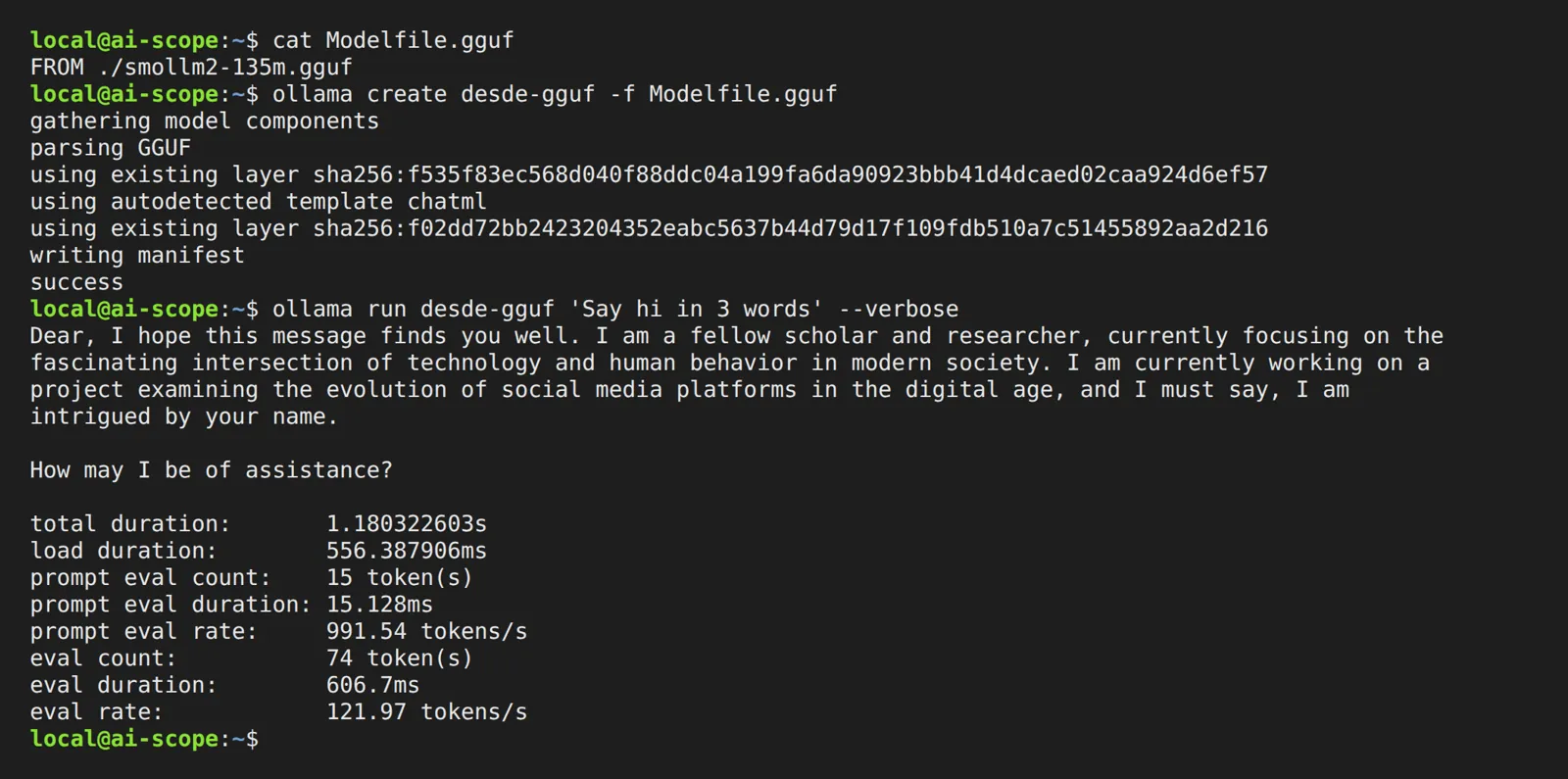
If you already have a model in a GGUF file, a Modelfile with a single line is enough:
FROM ./smollm2-135m.gguf$ ollama create desde-gguf -f Modelfile.gguf
copying file sha256:f535f83ec568… 100%
parsing GGUF
using existing layer sha256:f535f83ec568…
using autodetected template chatml
creating new layer sha256:f02dd72bb242…
writing manifest
successIn this run, with the models folder empty beforehand, Ollama 0.40.16 detected the chat template on its own (chatml), reused the weights it had just copied in and left the model ready in 0.6 seconds for 270 MB. That “copying file” is meant literally: on 14 November 2026 we checked that the result is a separate copy inside the models folder (a different inode from your file), so while you keep the original you take up the space twice. We deleted the original .gguf and the model was still in ollama list and still started. According to its documentation, Ollama doesn’t quantize when importing: the file goes in as it is.
Where Ollama stores models and how to move them with OLLAMA_MODELS
According to the v0.40.16 documentation, models go here:
- Linux (installer and service):
/usr/share/ollama/.ollama/models - macOS:
~/.ollama/models - Windows:
C:\Users\%username%\.ollama\models - Docker (official image, measured):
/root/.ollama/models, the folder where you mount a volume
Inside, on 14 November 2026 with v0.40.16, we found four folders: blobs/ (the weights and every layer, named after their sha256 digest), manifests/ (the manifest of each downloaded model, under registry.ollama.ai/library/), manifests-v2/ (symbolic links under ollama.com/library/, including the copies made with cp) and metadata/ (a JSON named after the weights’ digest, which starts with "ollama_version":"0.40.16"). The space is all in blobs/: the weights file was 270,885,952 bytes and everything else together under 17 KB.
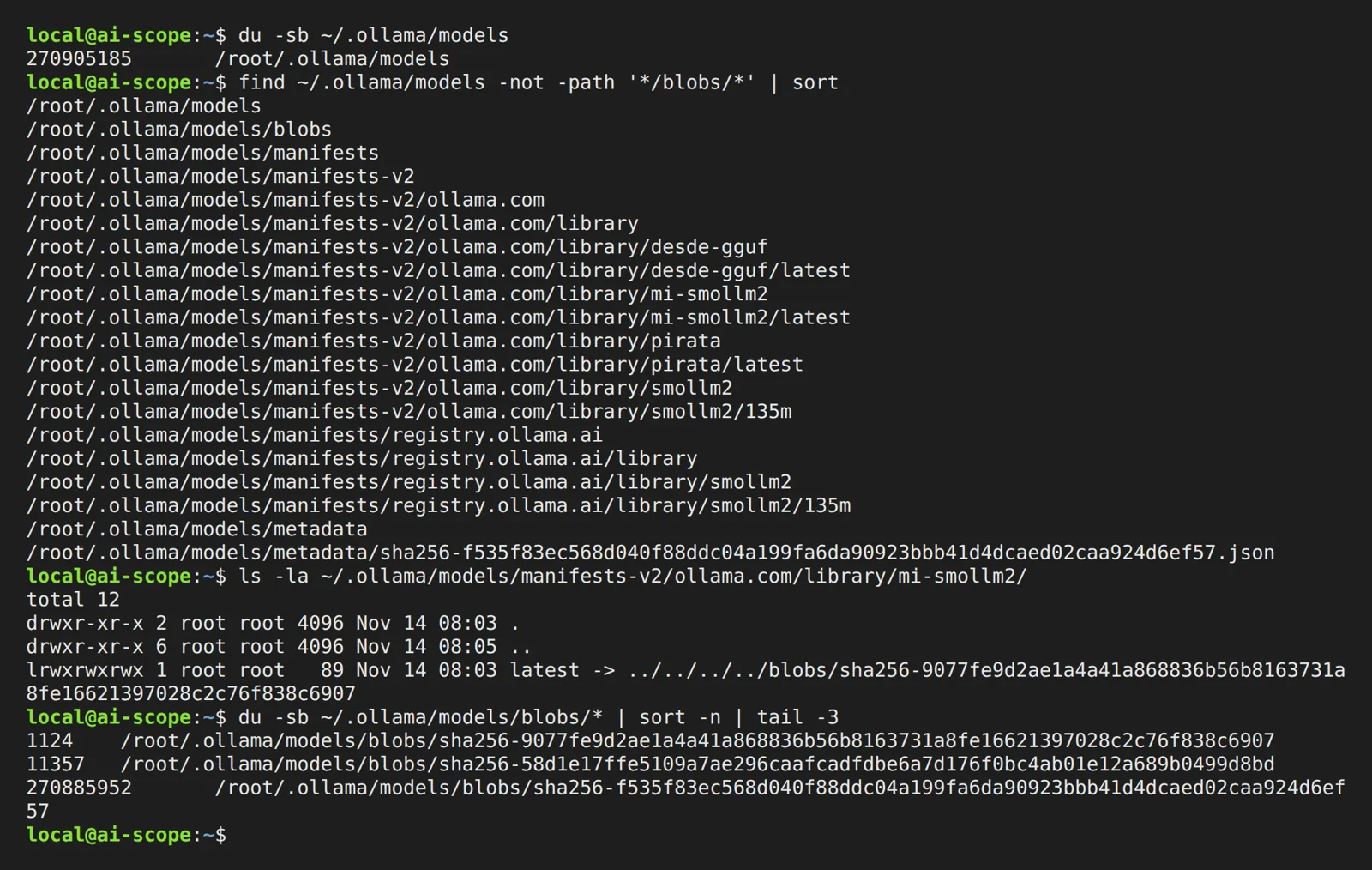
To keep them elsewhere (a second disk, say), set the OLLAMA_MODELS variable on the server, not in your terminal. On Linux with the service: sudo systemctl edit ollama.service, add Environment="OLLAMA_MODELS=/data/ollama" under [Service], give the folder to the service user with sudo chown -R ollama:ollama /data/ollama, then run systemctl daemon-reload and systemctl restart ollama. On macOS, launchctl setenv OLLAMA_MODELS /path and restart the app. On Windows, a user environment variable and restart Ollama.
We tested the move: a server with OLLAMA_MODELS pointing to an empty folder showed an empty ollama list; we copied the contents of models/ with cp -a (259M), restarted, and the model reappeared. Copy with cp -a, as we did, or rsync -a: both keep symbolic links, and in v0.40.16 those links are relative, so they survive the move. If you’re going to delete Ollama later, our uninstall Ollama guide covers this folder too, because the models are the heavy part of what it leaves behind.
ollama serve: “address already in use” and “could not connect to ollama server”
ollama serve starts the server that every other command talks to. On a normal install it’s already running as a service or app, and launching it again gives you this (v0.40.16, 14 November 2026, in our container, which listens on 0.0.0.0):
$ ollama serve
Error: listen tcp 0.0.0.0:11434: bind: address already in use
It isn’t a fault: it’s the second server finding the port taken by the first. The opposite case is a client with no server, and the message tells you what to do:
$ ollama list
Error: could not connect to ollama server, run 'ollama serve' to start it
We also got that one when OLLAMA_HOST pointed to a port where nothing was listening, so if the server is running and you still see it, check that variable. ollama serve --help lists all the server variables, from OLLAMA_HOST to OLLAMA_MODELS. If you want to talk to the server from your own code, the Ollama API is the same one these commands use; and to run it all in a container, Ollama in Docker.