Docker Model Runner is Docker’s own way of running AI models on your computer: a docker model plugin plus a container that runs them with llama.cpp and serves an OpenAI- and Ollama-compatible API on port 12434. On Linux you install it with apt-get install docker-model-plugin; on Mac and Windows you switch it on in Docker Desktop.
We installed version 1.2.9 on 17 November 2026 on a Linux server with Docker Engine 29.9.3, Ubuntu 26.04 and no GPU (an AMD Ryzen 7 7730U processor with 16 threads), and we measured everything we could: how long it takes, how much disk and memory it uses, which addresses it listens on, what it sends over the network and how it compares with Ollama running the same model. We also broke it on purpose, because the error messages are where you lose the most time. Everything in this guide refers to that version and that date.
What Docker Model Runner is (and what it isn’t)
It isn’t a new inference engine. In version 1.2.9, docker model status lists llama.cpp as the only engine running on our machine, with the rest marked as not installed: diffusers, vllm (“binary not found”), sglang and mlx (“only supported on Apple Silicon”).
 llama.cppRuntime sheet
What Docker adds is the packaging around it. Models are downloaded like images, from the ai/ namespace on Docker Hub or straight from Hugging Face with hf.co/…, and you manage them with commands that will feel familiar if you already use Docker: pull, run, list, ps, rm. On Linux with Docker Engine, all of this lives in a container called docker-model-runner with a volume called docker-model-runner-models. If you’d rather work with llama.cpp directly, our guide to running llama.cpp locally covers that route.
Install Docker Model Runner on Linux (docker-model-plugin)
On Linux, the plugin comes from Docker’s own repository, the same one Docker Engine comes from. Before installing it, any docker model command fails with this message:
$ docker model version
docker: unknown command: docker model
The installation is a single package:
sudo apt-get update
sudo apt-get install docker-model-plugin
On Fedora and other RPM distributions, it’s sudo dnf install docker-model-plugin. On our server the apt-get install took 4.53 seconds and left a single 28 MB binary in /usr/libexec/docker/cli-plugins/docker-model. Docker wasn’t restarted and none of the containers already running noticed a thing.
The real installation happens the first time you use it. Our first docker model run ai/smollm2 "…" took 20.53 seconds in total, and in that time it downloaded the docker/model-runner:latest image (356 MB compressed, 1.37 GB on disk), created the models volume, started the container, downloaded the 270.60 MB model and answered the question. From then on, a question to the model that’s already loaded came back in 0.35 seconds.
Enabling it on Mac and Windows (Docker Desktop)
In Docker Desktop there’s nothing to install: go to Settings → AI and tick Enable Docker Model Runner. On Windows with an NVIDIA card there’s a second box, Enable GPU-backed inference. If you want to call the API from the host itself (from a script or an editor, for example), also tick Enable host-side TCP support, or run docker desktop enable model-runner --tcp 12434.
Docker’s requirements, which we read but couldn’t test here: a Mac with Apple Silicon; on Windows x64, NVIDIA drivers 576.57 or later; on Windows on Arm, an Adreno 6xx or newer GPU. On Linux with Docker Engine, it runs on CPU, NVIDIA (CUDA, driver 575.57.08 or later), AMD (ROCm) and Vulkan. On Mac and Windows the engine doesn’t run in a container like it does on Linux, but in a sandbox on the system itself.
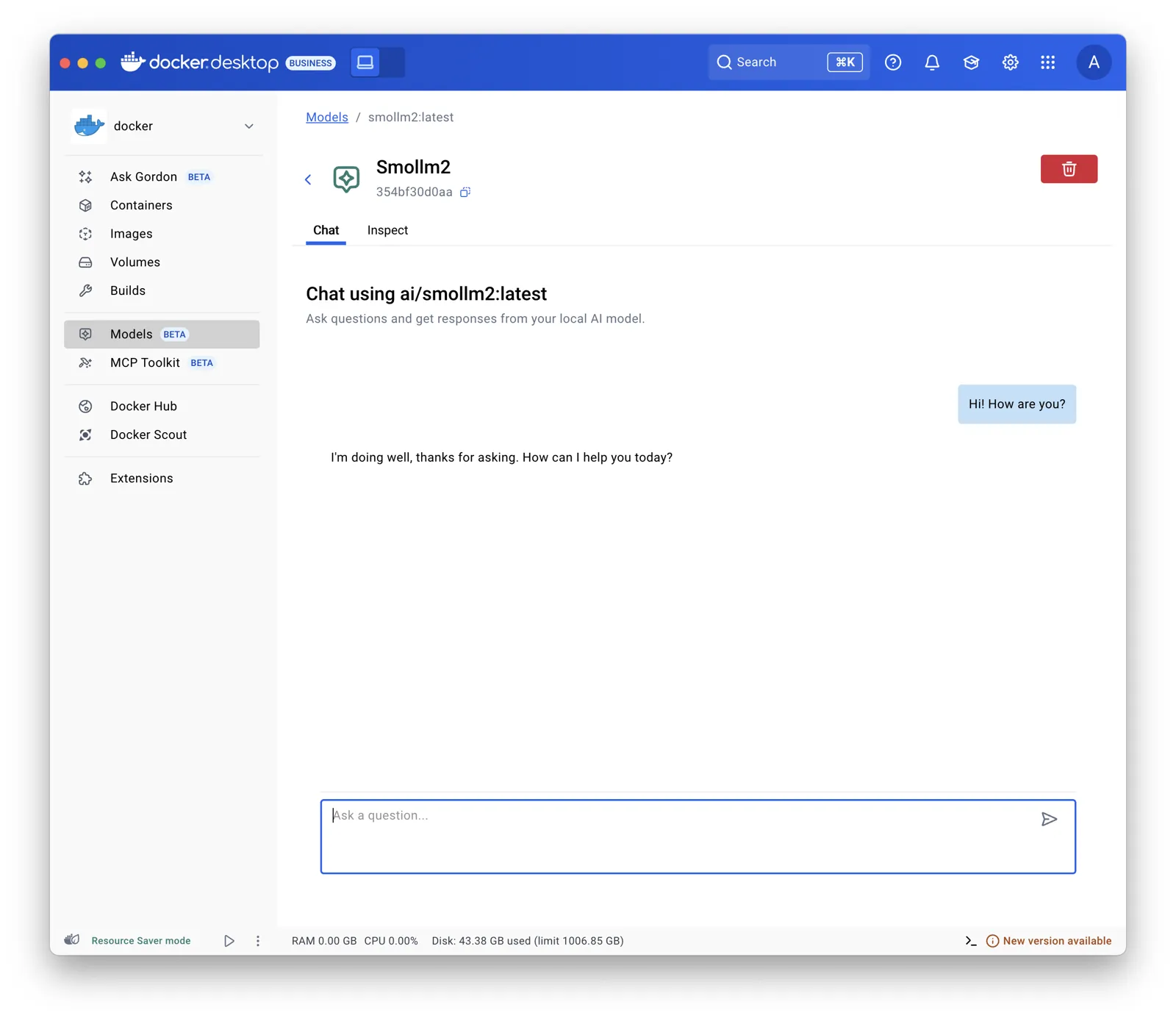
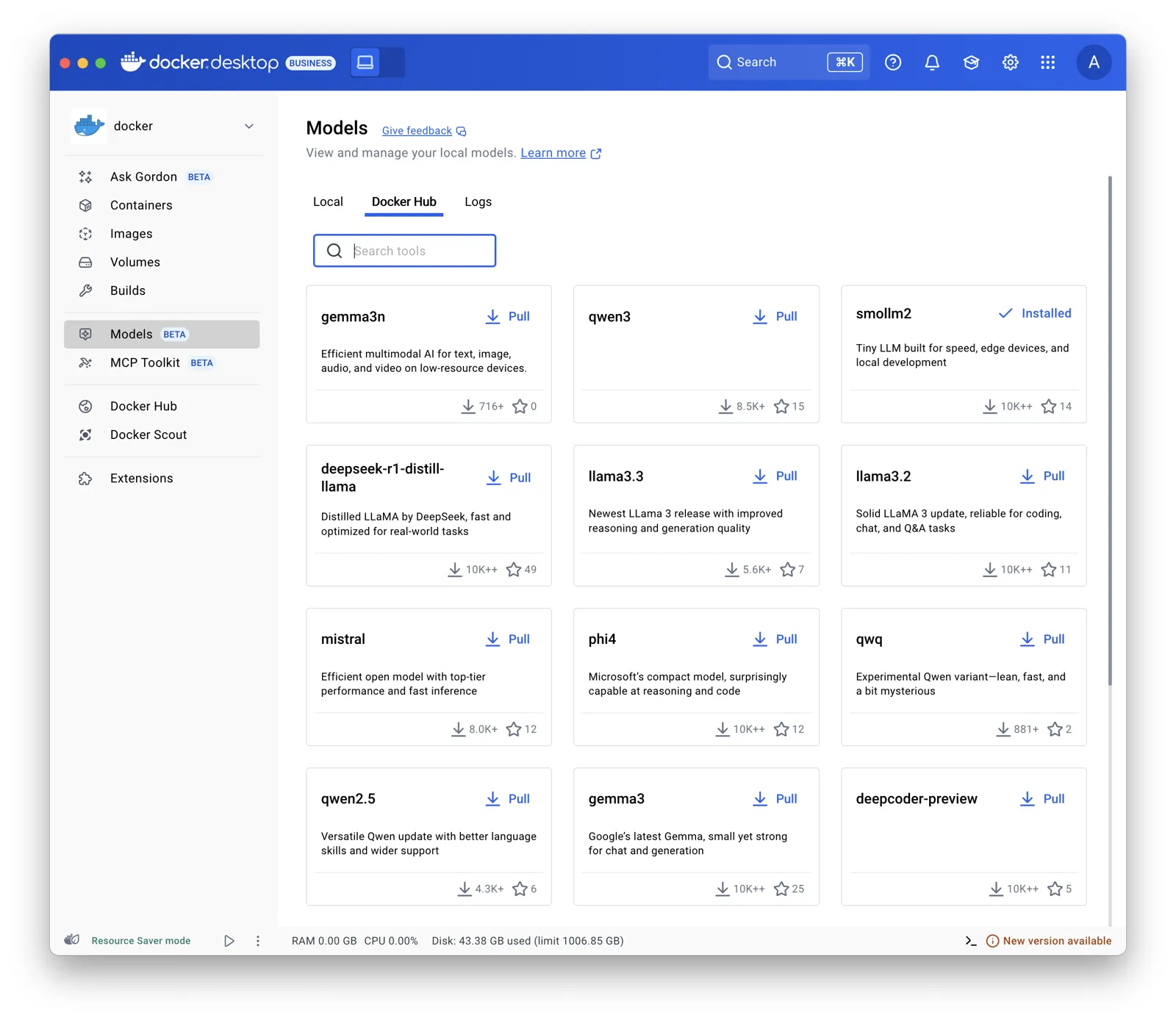
Desktop also adds a Models section with the catalogue and a chat to try out each model without opening a terminal.
Your first model: docker model run ai/smollm2
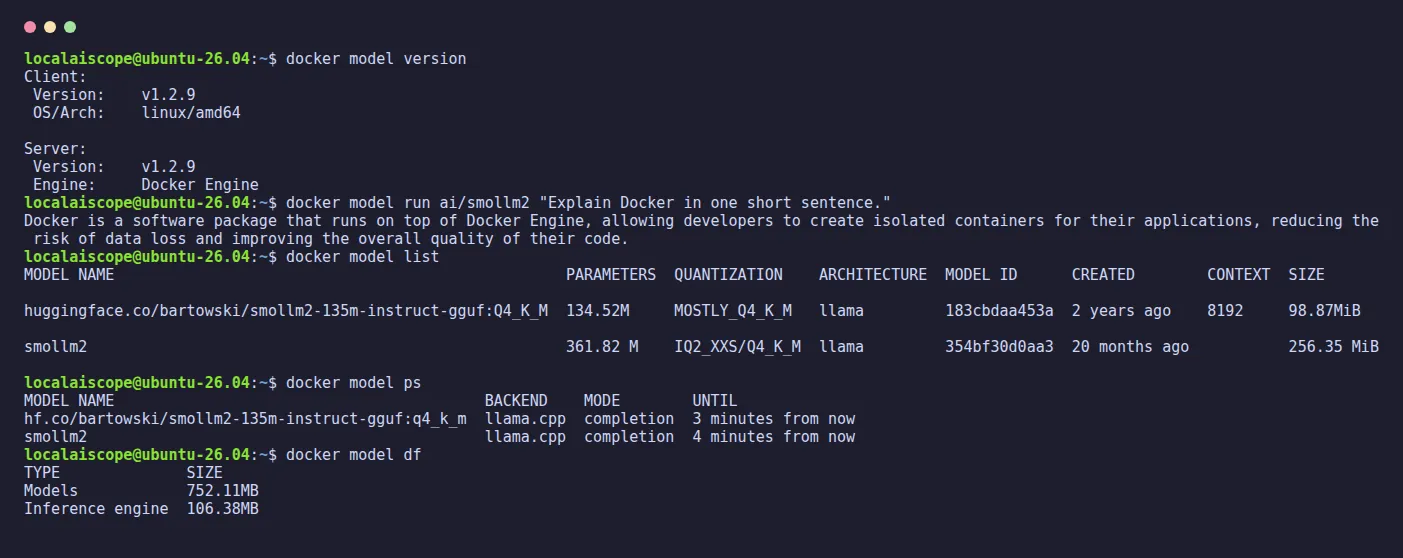
docker model run works in two ways: with a question in quotes it answers once and returns you to the prompt; without one, it opens an interactive chat (you leave with /bye, according to its code). If the model isn’t there yet, it downloads it first. We chose ai/smollm2 (361.82 million parameters, quantized to Q4_K_M) because it’s tiny and answers in under a second on a CPU alone. In exchange, it has its moments: we asked it to count to three and it replied “Three, four, five.”. Small models, big enthusiasm.
$ docker model list
MODEL NAME  PARAMETERS  QUANTIZATION    ARCHITECTURE  MODEL ID      CREATED        CONTEXT  SIZE
smollm2     361.82 M    IQ2_XXS/Q4_K_M  llama         354bf30d0aa3  20 months ago           256.35 MiB
docker model ps shows what’s loaded in memory and until when: after each use, our model showed “4 minutes from now” in the UNTIL column. We left it alone to see what happened: 5 minutes after the last question it unloaded itself, the engine process disappeared and the container dropped to 8.7 MiB of memory. docker model unload ai/smollm2 unloads it on the spot without deleting anything (“Unloaded 1 model(s).”), and the next question, with the model loading from scratch, took 0.77 seconds. To delete it from disk, docker model rm ai/smollm2.
Models from Hugging Face come in with the hf.co/ prefix and the quantization as the tag. docker model pull hf.co/bartowski/SmolLM2-135M-Instruct-GGUF:Q4_K_M took 3.26 seconds for 105.45 MB, although the progress counter got as far as “Downloaded 210.92MB of 105.45MB”: downloading twice what a file weighs is a talent. In list it then appears as huggingface.co/bartowski/smollm2-135m-instruct-gguf:Q4_K_M.
The Docker Model Runner API on port 12434
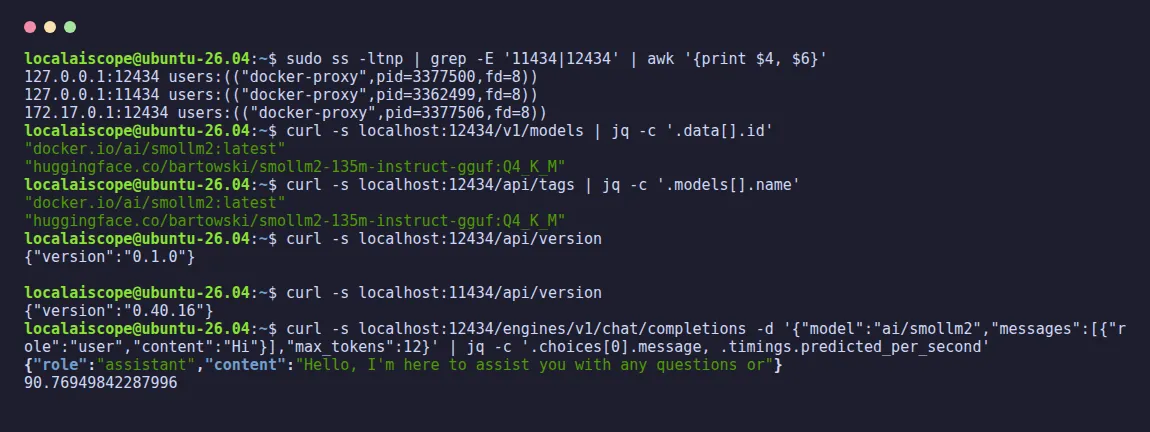
With Docker Engine, the runner listens on 127.0.0.1:12434 and on 172.17.0.1:12434 (the host’s address on Docker’s default network). It listens only on those two addresses: from the server itself, calling its own local-network address, the connection failed. According to Docker, the API has no authentication, so if a client asks for a key, any text will do.
The same port serves three families of paths, all of which answered 200 in our test:
| Path | Compatible with |
What we checked |
|---|---|---|
/engines/v1/models, /engines/v1/chat/completions |
OpenAI | Model list and chat, with usage and timings |
/v1/models, /v1/chat/completions |
OpenAI (alias) | Same answer as /engines/v1 |
/api/tags, /api/ps, /api/chat, /api/generate, /api/version |
Ollama | Lists, chats and generates; version 0.1.0 |
A first request with curl, which also tells you the speed (timings.predicted_per_second):
curl http://localhost:12434/engines/v1/chat/completions \
  -H "Content-Type: application/json" \
  -d '{"model":"ai/smollm2","messages":[{"role":"user","content":"Hi"}]}'
Because it uses its own port, it lives alongside Ollama without any conflict: we had Ollama on 11434 and Docker Model Runner on 12434 at the same time, each answering with its own version. If you’re coming from Ollama, our guide to the Ollama API uses the same /api/… paths, which here change only the port.
Using it from other containers and with Open WebUI
From a container on Docker’s default network, the address is http://172.17.0.1:12434. With Compose you can give it a name using extra_hosts: ["model-runner.docker.internal:host-gateway"], which is the name Docker Desktop uses. Without that line, the name doesn’t exist: wget: bad address 'model-runner.docker.internal:12434'.
On our server, though, the first attempt failed with wget: can't connect to remote host (172.17.0.1): Operation timed out. The culprit was ufw, with its default “deny incoming” rule: for the firewall, a container talking to the host is incoming traffic. A rule limited to Docker’s interface and that port fixed it, both through 172.17.0.1 and through model-runner.docker.internal (with the host-gateway line):
sudo ufw allow in on docker0 to 172.17.0.1 port 12434 proto tcpGoing by the API we tested, Open WebUI would connect through the Ollama-compatible layer with OLLAMA_BASE_URL=http://172.17.0.1:12434, or through the OpenAI one with OPENAI_API_BASE_URL=http://172.17.0.1:12434/engines/v1. We didn’t run Open WebUI against Docker Model Runner on this occasion; the rest of the setup (volume, first user, port) is in our guide to Open WebUI with Ollama.
What Docker Model Runner sends to Docker Hub (and how to turn it off)
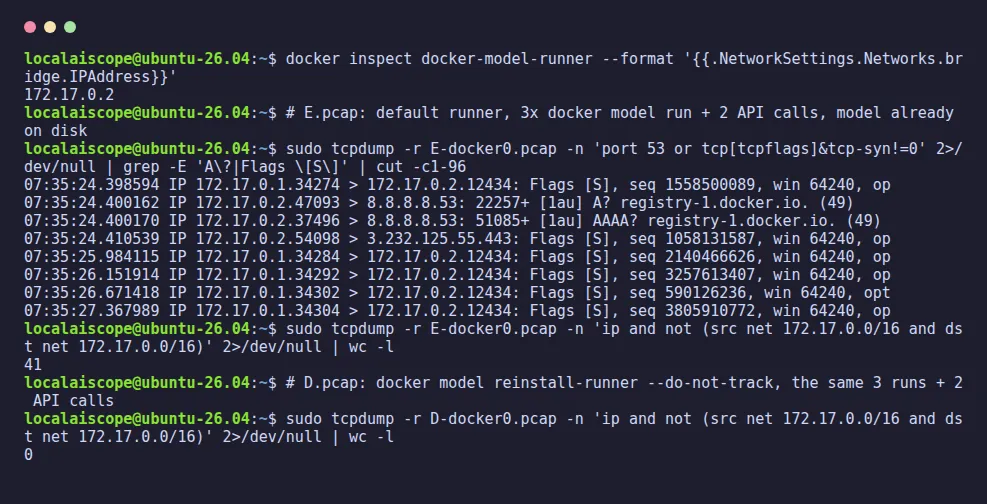
This is the test we were most curious about. We recorded the runner container’s traffic with tcpdump on docker0, the default Docker network, where on our server only that container was connected. With the model already on disk and the default settings, each use of the model meant a request to registry-1.docker.io: in the control test, 3 docker model run and 2 API calls produced a DNS lookup, one encrypted connection to Docker Hub and 5 requests, one per use going by the size of what was sent, with 41 packets leaving the computer in total. In version 1.2.9’s code, that request is a HEAD on the model’s manifest, used to count which models are being used.
Then we reinstalled the runner with the option to opt out:
docker model reinstall-runner --do-not-trackThe container now starts with DO_NOT_TRACK=1 and, with exactly the same 3 runs and 2 API calls, 0 IPv4 packets left the computer. The models stay where they were: reinstalling the runner doesn’t touch the volume.
--do-not-track Screenshot: our terminal, Docker Model Runner 1.2.9, 17 Nov 2026Docker Model Runner vs Ollama: our measurement
Same model (SmolLM2 360M quantized to Q4_K_M), same prompt (a story of about 200 words, 256 tokens, temperature 0), same CPU, both running at the same time on the same day. Ollama is version 0.40.16 in its official Docker image; underneath, both use llama.cpp. Watch out for one detail: Ollama’s tag smollm2:360m is the F16 version (725 MB), so for a fair comparison we used smollm2:360m-instruct-q4_K_M, which weighs the same as Docker’s. In the table, DMR is Docker Model Runner.
| 17 Nov 2026 | DMR 1.2.9 |
Ollama 0.40.16 |
|---|---|---|
| Speed (tok/s) | 78–82 | 83–89 |
| Model on disk (MB) | 270.6 | 270.6 |
| Image on disk (GB) | 1.37 | 8.52 |
| Engine process, RSS (MiB) | 224 | 484 |
| Container, docker stats (MiB) | 95 | 878 |
| Context in our test | 8,192 | 4,096 |
| Port | 12434 | 11434 |
If you’re weighing up Ollama in a container instead, our guide to Ollama in Docker explains the volume and the port, and for serving many users on an NVIDIA GPU, the comparison vLLM vs Ollama is the next step.
GPU and vLLM: what we could and couldn’t test
On Linux, according to the code of version 1.2.9, the runner chooses its image according to the GPU it detects: latest-cuda for NVIDIA, latest-rocm for AMD, and the CPU image if there’s none. You can force it with --gpu cuda and choose the engine with --backend vllm, which requires CUDA. On our server, which has no NVIDIA GPU, both options failed, and that’s useful to know before trying: --gpu cuda downloaded the CUDA image (5.66 GB on disk) and only then gave up, after 52.87 seconds. We couldn’t measure GPU speeds; when we can, they’ll go here with their date.
Opens on YouTube (no cookies) only when you press play.
Docker’s own one-minute introduction, published in April 2025: some screens may look different in version 1.2.9, the one we tested.
Docker Model Runner errors, with their exact message
These are the messages we got on 17 November 2026 with version 1.2.9, and what each one means:
| Message | Cause | What to do |
|---|---|---|
docker: unknown command: docker model |
The plugin isn’t installed | sudo apt-get install docker-model-plugin |
pull access denied, repository does not exist or may require authorization (status 500) |
The model name doesn’t exist | Check the name in the ai/ catalogue |
failed with status 404 Not Found: Model not found |
The model exists but that tag doesn’t | Check the tag (the part after the colon) |
Failed to remove model: no such model |
rm of a model you don’t have |
docker model list to see the exact name |
failed to bind host port 127.0.0.1:12434/tcp: address already in use |
Another program is using port 12434 | Free it, or install with --port |
--backend vllm requires CUDA GPU support |
vLLM without an NVIDIA GPU | Go back to the default engine (llama.cpp) |
failed to discover GPU vendor from CDI: no known GPU vendor found |
--gpu cuda without an NVIDIA GPU |
Install without --gpu |
dial tcp 127.0.0.1:12434: connect: connection refused |
The CLI is looking for the runner on 12434 and it’s elsewhere | Point MODEL_RUNNER_HOST at the right port |
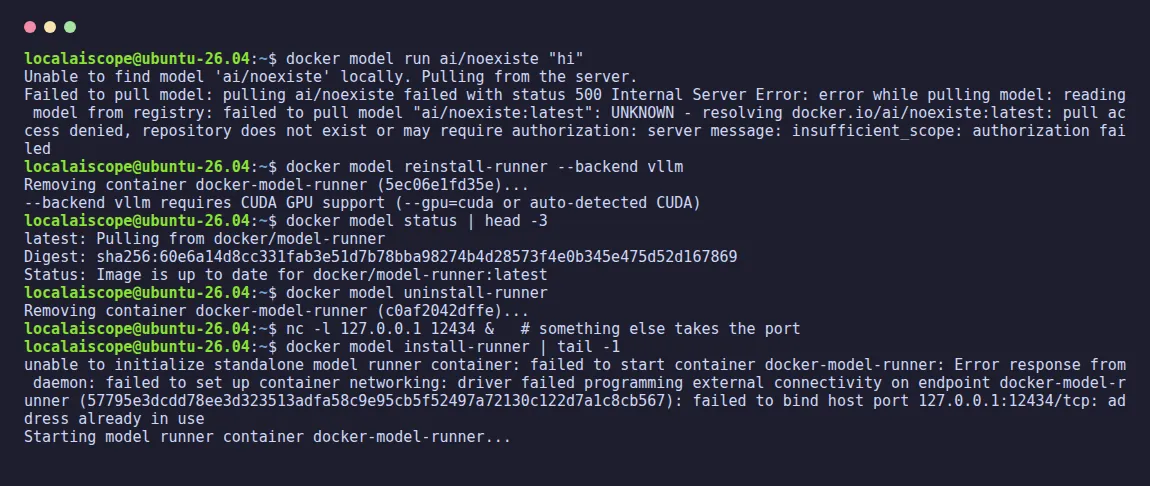
Two of them deserve a note. docker model reinstall-runner --backend vllm first removes the container and then fails: you’re left without a runner until the next docker model command, which recreates it on its own with the CPU image. And if you install with --port 12435 because 12434 is taken, the command prints “standalone model runner took too long to initialize”, but the runner is working fine on 12435; the one getting lost is the CLI, which keeps looking for 12434.