To run Open WebUI with Ollama, start both in Docker on the same network and point Open WebUI at Ollama with the OLLAMA_BASE_URL variable, in our case http://ollama:11434. Open http://localhost:3000 and create your account: it becomes the admin. If nothing should leave your machine, add OFFLINE_MODE=true and ENABLE_OPENAI_API=false.
Open WebUI is the ChatGPT-style web interface that turns a terminal-only Ollama into something you can use from a browser, your phone or any laptop in the house. We set it up on 13 November 2026 with the latest stable release as of that date, v0.13.3 (published on 8 November), on an Ubuntu server with Docker, next to Ollama 0.40.15 in its own container with two tiny models (smollm2:135m and qwen3:0.6b). And since the whole point of local AI is that your stuff stays home, we recorded the Open WebUI container’s network traffic from first start to last chat and wrote down every outbound connection. Whatever this guide says we “measured” comes from those tests; when something comes from reading the v0.13.3 source code instead, we say so.
 OllamaRuntime sheet
Install Open WebUI with Ollama in Docker: the setup we used
Two containers on one Docker network: one runs Ollama, the other Open WebUI. That way Open WebUI finds Ollama by name and never depends on the host’s address, which is exactly where most Linux setups get stuck (the exact error is further down). This is the setup, with friendlier names than the ones in our tests:
docker network create ia-local
docker run -d --name ollama --network ia-local -v ollama:/root/.ollama ollama/ollama
docker exec ollama ollama pull smollm2:135m
docker run -d --name open-webui --network ia-local \
  -p 127.0.0.1:3000:8080 \
  -e OLLAMA_BASE_URL=http://ollama:11434 \
  -e OFFLINE_MODE=true -e ENABLE_OPENAI_API=false \
  -v open-webui:/app/backend/data \
  ghcr.io/open-webui/open-webui:v0.13.3
Three details matter. We publish the port on 127.0.0.1 only: the project’s own command uses -p 3000:8080, which opens the web UI on every network interface of the machine, while the prefix keeps it reachable from this computer alone. The open-webui volume holds users, chats, settings and caches (everything lives in /app/backend/data), so you can delete and recreate the container without losing anything. And we pin the v0.13.3 tag: on 13 November, :main and :latest pointed to a different build from the stable release. If you want it to start with the machine, add --restart always, as the official command does.
The two variables at the end are the privacy ones, and they get their own section because their effect shows up on the wire. Open http://localhost:3000 and this is what greets you:
If Ollama isn’t in Docker yet, our Ollama in Docker guide covers the model volume, the port and the GPU.
The first user becomes the admin (and sign-up closes by itself)
After “Get started” comes a form with name, email and password, and the button tells you what’s about to happen: “Create Admin Account”. The first account created is the administrator. The email isn’t verified (an example.com address worked fine for us), so use any address you’ll remember.
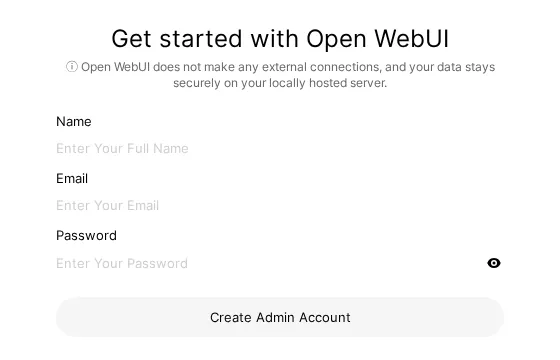
We checked it on three clean installs: the first sign-up came back with the admin role in under 0.3 seconds, and sign-up closed at that same moment. A second attempt got a 403 with this message:
You do not have permission to access this resource. Please contact your administrator for assistance.So create your account right after the first start, especially if other devices on your network can see the page: whoever gets there first is the admin. If you want more accounts later, according to the code sign-up can be reopened from the admin settings: it’s the same switch that turned itself off.
What Open WebUI connects to out of the box
First we started it with neither privacy variable, only the Ollama address, and watched its network while creating the account and chatting. Three destinations showed up:
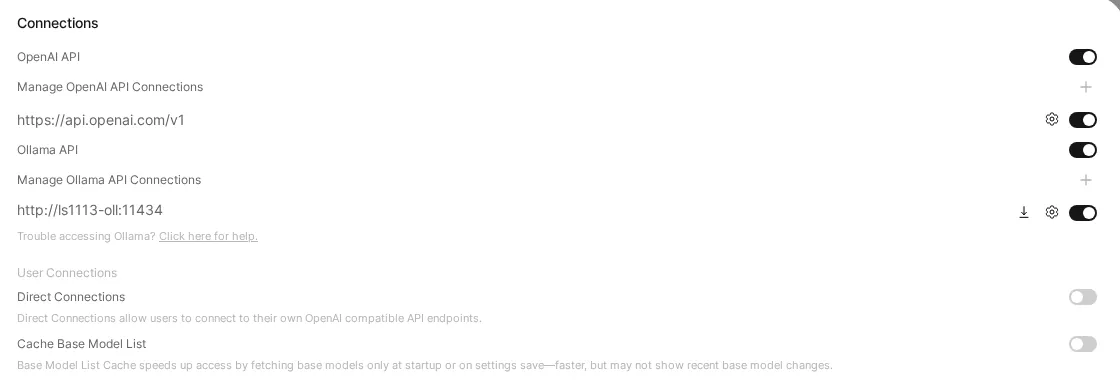
The OpenAI part is explained on the connections screen: the OpenAI API connection comes switched on, with https://api.openai.com/v1 filled in, even though you never gave it a key. What we measured is where each connection goes, not what’s inside it; according to the code, one downloads a model, one asks for the latest version and one requests OpenAI’s model list. Still, if you built this so nothing leaves the house, the sensible goal is that nothing leaves the house.
After a restart with the same volume it downloaded nothing: a single 11.6 KB connection to Hugging Face.
Open WebUI offline: OFFLINE_MODE and ENABLE_OPENAI_API
We ran the test twice more, each time on a fresh volume. Here’s what went out:
| Variables | Hugging Face | GitHub | api.openai.com | First start |
|---|---|---|---|---|
| None (defaults) | ≈804 MB | yes | yes | 33.9 s |
OFFLINE_MODE=true |
0 | 0 | yes (6 connections) | 20.0 s |
OFFLINE_MODE=true + ENABLE_OPENAI_API=false |
0 | 0 | 0 | 19.8 s |
With both variables set, Open WebUI’s only connections went to Ollama, inside the Docker network. Not one went outside. In the v0.13.3 code, OFFLINE_MODE does this, among other things: it sets HF_HUB_OFFLINE=1, turns off the version check, stops updating the embedding models and skips installing add-on dependencies. The embedding model bundled in the image still loaded from disk, so document search isn’t left without it. The HF_HUB_OFFLINE=1 suggested in the project’s docs only cuts Hugging Face, not GitHub. And ENABLE_OPENAI_API=false flips off the OpenAI switch you saw in the screenshot.
One more thing: OFFLINE_MODE belongs to Open WebUI, not to Ollama. When you ask Ollama for a new model, Ollama downloads it from its registry as usual.

Yes: we asked for a three-word greeting, with Hugging Face cut off of all things, and it replied “Hi, welcome to Hugging Face.” You can’t expect finer irony from 135 million parameters.
“does not support tools”: the first message that fails
With the default settings, our first message to smollm2:135m got no answer. Instead, the interface showed this:
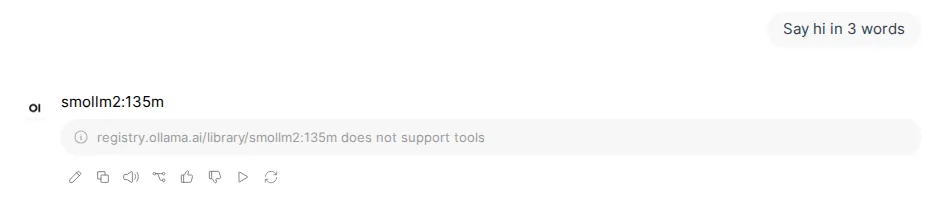
registry.ollama.ai/library/smollm2:135m does not support toolsOut of the box, v0.13.3 sends its built-in tools to the model with every message (we saw it in the code: they’re on whenever “Function Calling” isn’t set to “Legacy”), and Ollama refuses if the model doesn’t support tools. With qwen3:0.6b, which does support them, it was worse: 30 seconds later it was still “Exploring create_tool”, busy exploring tools instead of saying hello.
The fix that worked for us: in Settings → General → Advanced Parameters, set Function Calling to Legacy (the button cycles through Default, Native and Legacy) and save. After that, smollm2:135m answered “Hello!” (one word out of the three requested, but an answer) and qwen3:0.6b said “Hi!” after thinking for 5 seconds. Another route, which we read in the code but didn’t test: in Admin → Models, switch off the “Builtin Tools” capability on the small models only.
“Cannot connect to host host.docker.internal:11434”: Open WebUI can’t see Ollama on Linux
Start Open WebUI without OLLAMA_BASE_URL and v0.13.3 looks for Ollama at http://host.docker.internal:11434. On Linux, that name doesn’t exist inside a container unless you provide it. We tried it: the model list came back empty and docker logs open-webui said, verbatim:
Connection error: Cannot connect to host host.docker.internal:11434 ssl:default [Name or service not known]You have three ways out, cleanest first:
- The same Docker network, as in our setup, with
OLLAMA_BASE_URL=http://ollama:11434. It worked first time in every one of our tests. --network hostwithOLLAMA_BASE_URL=http://127.0.0.1:11434, if Ollama listens on the machine itself. We tested it with Ollama published on the server’s127.0.0.1:11434and both models appeared. According to the project’s docs and start script, with host networking the port is no longer 3000 but 8080, and Open WebUI listens on every interface unless you setHOST=127.0.0.1(which we did).--add-host=host.docker.internal:host-gateway, which is what the official command includes. The name then exists, but Ollama must listen on an address the container can reach: by default it listens on 127.0.0.1 only, and you change that with theOLLAMA_HOSTvariable of its service.
If the message comes out empty, Connection error: with nothing after it and about 10 seconds of waiting, the name is no longer the problem: something is swallowing the connection on the way. On our server it was the firewall (ufw, which drops traffic from containers to the host): even with Ollama published on Docker’s address we couldn’t connect. That’s why we prefer option 1, which never goes through the host.
Opens on YouTube (no cookies) only when you press play.
This video shows the classic Ubuntu case: Open WebUI starts, no model shows up, and the fix is to set OLLAMA_HOST in Ollama’s service to the Docker gateway IP (172.17.0.1), so only the machine itself can reach it.
For the rest of Ollama’s messages, see our list of Ollama errors with their exact text.
How much space it takes and how long it takes to start
The v0.13.3 image was a 1.66 GB download and takes 6.46 GB on disk; docker pull took 60 seconds on our connection. Models live separately, in Ollama’s volume.
The first start, Hugging Face download included, took 33.9 seconds to respond. With OFFLINE_MODE=true, 19.8 seconds. A restart with the volume already filled, 17.6. At idle the container used between 658 MiB and 996 MiB of RAM depending on the test, and barely moved while chatting, because Ollama does the heavy lifting. In other words, Open WebUI asks for little more than 1 GB of memory on its own: what decides which models you can run is still your hardware, and that’s what our Ollama runtime page covers.
A perk of having the interface in a web page: you use it from your phone without installing anything. Our test at 390 pixels wide answered “HELLO”, all caps, like someone greeting you from the other end of the hall.
Check that everything is in order
Four quick checks:
curl http://127.0.0.1:3000/api/versionshould return{"version":"0.13.3",…}.- In Admin → Settings → Connections, Ollama with your address and OpenAI switched off (if you used
ENABLE_OPENAI_API=false). docker logs open-webuiwithout a singleConnection error.- A short message to a small model that gets an answer. If you see “does not support tools”, you know where Legacy is.
If you want to go beyond the interface, the Ollama API is the same one Open WebUI uses underneath, and our guide to context length in Ollama explains how much of the conversation the model keeps in mind. And when a new Ollama release comes out, here’s how to update Ollama without losing your models.