Ollama’s environment variables go on the server, not in your terminal: a systemd override on Linux (Environment=), launchctl setenv on macOS, user variables on Windows and -e in Docker. To check what it actually picked up, read the server config line that ollama serve prints when it starts.
We started Ollama 0.40.16, the latest stable release on 19 November 2026, twice over: the official Linux binary from the release tarball (19 November) and the official ollama/ollama:0.40.16 Docker image (18 November), with no model loaded, on a server with no GPU. Every default below comes from the server’s own startup line, and we fed it a few deliberately silly values to see what it does with them. Some of the answers surprised us.
 OllamaRuntime sheet
All 26 OLLAMA_ variables and their default values in v0.40.16
When it starts, ollama serve v0.40.16 prints a server config line with 40 variables and the value it’s using; 26 of them start with OLLAMA_ (the other 14 are proxy, GPU and llama.cpp variables). This is the table, with the default value we measured with no variables set:
| Variable | Default (measured, v0.40.16, 18/19 Nov 2026) | What it does |
|---|---|---|
OLLAMA_HOST |
http://127.0.0.1:11434 (Docker image: 0.0.0.0:11434) |
Address and port the server listens on |
OLLAMA_ORIGINS |
17 local origins (localhost, 127.0.0.1, 0.0.0.0, app://, file://, tauri://, vscode-webview://, vscode-file://) |
Web origins allowed to call the API (CORS) |
OLLAMA_KEEP_ALIVE |
5m0s |
How long a model stays in memory after the last request |
OLLAMA_MODELS |
$HOME/.ollama/models (Docker: /root/.ollama/models) |
Folder where models are stored |
OLLAMA_CONTEXT_LENGTH |
0 (automatic: 4096 on our machine with no GPU) |
Default context when the request doesn’t set one |
OLLAMA_NUM_PARALLEL |
1 |
Requests each model handles at the same time |
OLLAMA_MAX_LOADED_MODELS |
0 (automatic) |
Models loaded at the same time |
OLLAMA_MAX_QUEUE |
512 |
Requests waiting in the queue before it starts refusing |
OLLAMA_FLASH_ATTENTION |
false |
Forces flash attention on (1) or off (0) |
OLLAMA_KV_CACHE_TYPE |
empty (f16) |
Quantization of the context cache: q8_0 or q4_0 |
OLLAMA_LOAD_TIMEOUT |
5m0s |
How long a stalled model load may take before giving up |
OLLAMA_GPU_OVERHEAD |
0 |
Graphics memory reserved per GPU, in bytes |
OLLAMA_SCHED_SPREAD |
false |
Always spreads a model across all GPUs |
OLLAMA_IGPU_ENABLE |
empty | Enables integrated GPUs |
OLLAMA_VULKAN |
true |
Vulkan backend |
OLLAMA_LLM_LIBRARY |
empty | Forces a library and skips autodetection |
OLLAMA_DEBUG |
INFO |
Log level (1 = DEBUG) |
OLLAMA_DEBUG_LOG_REQUESTS |
false |
Logs request bodies to a temporary folder |
OLLAMA_NO_CLOUD |
false |
Turns off the ollama.com cloud features |
OLLAMA_REMOTES |
[ollama.com] |
Hosts allowed for remote models |
OLLAMA_CREATE_REMOTE |
false |
Forces create through the API even with a local server |
OLLAMA_MAX_TRANSFER_STREAMS |
4 |
Parallel streams when pulling or pushing safetensors models |
OLLAMA_NOPRUNE |
false |
Doesn’t clean up unused blobs at startup |
OLLAMA_NOHISTORY |
false |
Doesn’t keep the ollama run history |
OLLAMA_GO_TEMPLATE |
true |
Uses the Modelfile TEMPLATE when there is one |
OLLAMA_EDITOR |
empty | Editor for writing a prompt with Ctrl+G |
The descriptions are the ones v0.40.16 carries in its own code, put into plain words. ollama serve --help only lists 19 of the 26 (plus 2 from llama.cpp), so the startup line is the complete reference.
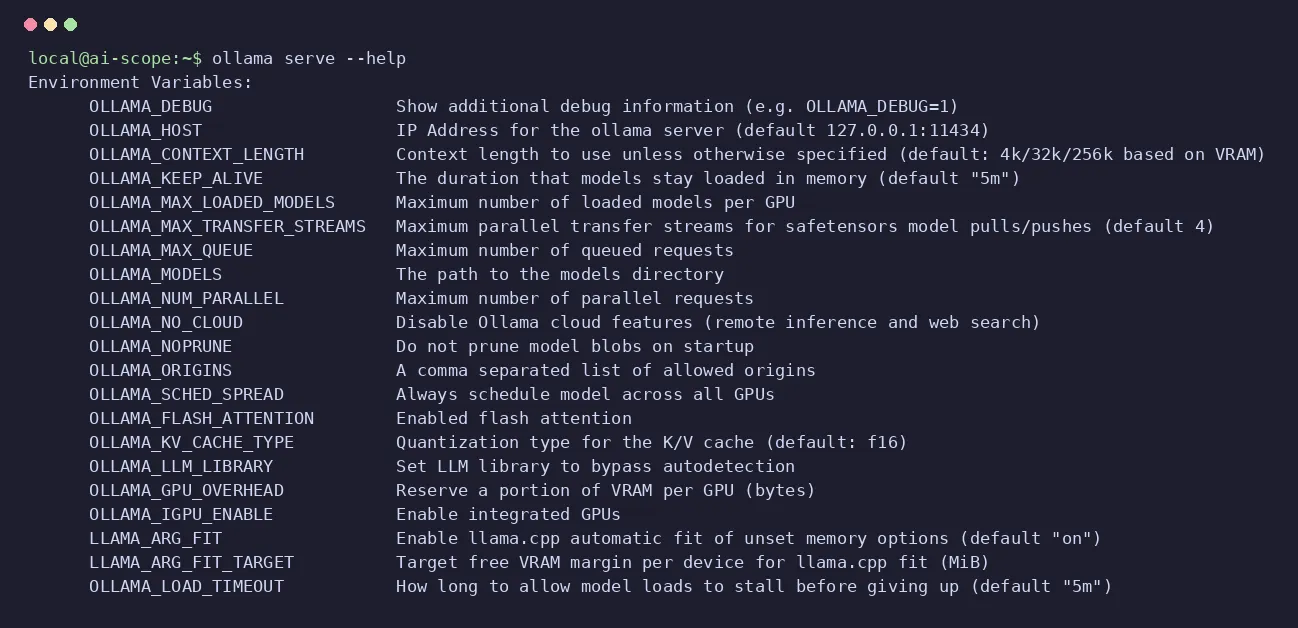
ollama serve --help shows: 19 OLLAMA_ ones out of the 26 the server actually reads Screenshot: our terminal, Ollama 0.40.16, 19 Nov 2026How to set Ollama environment variables on Linux, macOS, Windows and Docker
The variable has to reach the process that runs ollama serve. An export in your shell only reaches the commands you launch from that shell, and the server installed as a service or app never sees it. Per system, following the v0.40.16 documentation:
- Linux (systemd service):
sudo systemctl edit ollama.service, then oneEnvironmentline per variable under[Service], andsystemctl daemon-reloadplussystemctl restart ollama. - macOS (app):
launchctl setenv OLLAMA_HOST "0.0.0.0:11434"for each variable, then quit and reopen Ollama. - Windows: quit Ollama from the taskbar, open “Edit environment variables for your account”, add the variable and start Ollama again.
- Docker:
-e OLLAMA_KEEP_ALIVE=30mindocker run, or anenvironment:block in Compose.
[Service]
Environment="OLLAMA_HOST=0.0.0.0:11434"
Environment="OLLAMA_KEEP_ALIVE=30m"
If you start the server by hand, putting the variable in front is enough: OLLAMA_KEEP_ALIVE=30m ollama serve, the same format we used with the binary on 19 November. In Docker, on 18 November with v0.40.16, we passed four at once with -e and the startup line showed all four: 30m0s, 8192, 2 and the new port, 11500. In containers there’s more to it (volumes, GPU, ports), and our Ollama in Docker guide covers it.
Opens on YouTube (no cookies) only when you press play.
Six minutes on why these variables matter and how to set them on Mac, Linux and Windows, published in September 2024 with an older version of Ollama: for the defaults, trust our table, measured on v0.40.16.
How to see which variables Ollama has read: the server config line
There’s one line that clears up every doubt. In v0.40.16 it’s printed at INFO level by routes.go:2474 every time the server starts, and it has every variable with the value it’s going to use, whether it came from you or is the default:
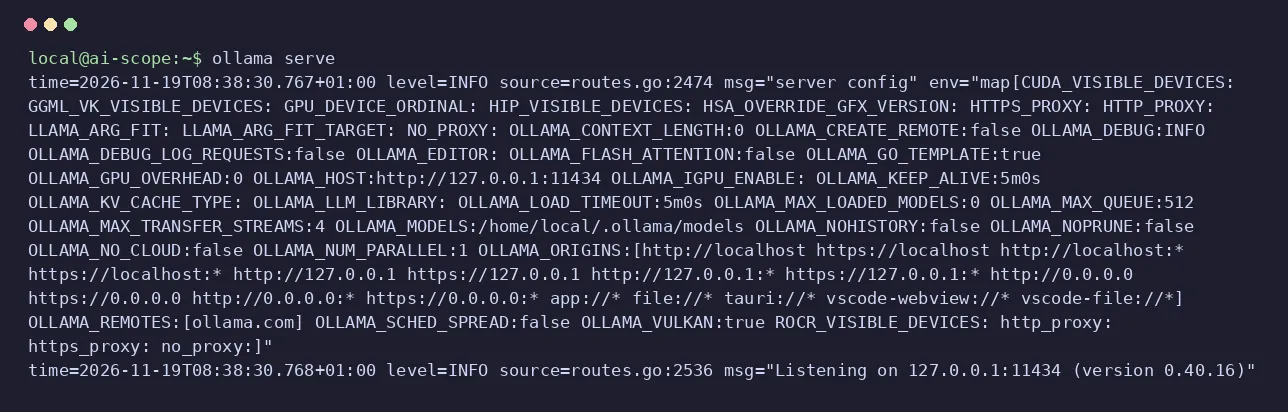
Where to find it depends on how Ollama runs. With the Linux service, journalctl -u ollama --no-pager | grep "server config"; in Docker, docker logs <container> 2>&1 | grep "server config"; and by hand, it’s the first thing ollama serve prints. If your variable shows up there with the value you wanted, the server has it; if it shows the default, it never got there (the usual cause: you set it in your shell and the service is a different process). In the same line you also check things like OLLAMA_KEEP_ALIVE:30m0s: the server writes durations in that full form.
OLLAMA_HOST: 127.0.0.1 by default, and 0.0.0.0 in Docker
On 19 November 2026 the official Linux binary of v0.40.16 started with no variables listening on 127.0.0.1:11434: only your own machine can reach it. We checked it from outside: the server answered {"version":"0.40.16"} on 127.0.0.1, and through the machine’s network IP the connection failed. With OLLAMA_HOST=0.0.0.0 (no port) it went to [::]:11434, every interface, and kept the 11434 port.
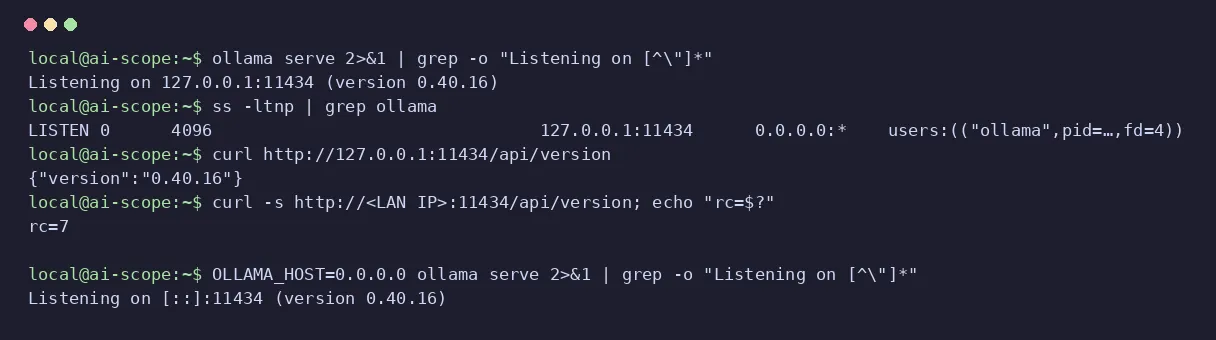
The official Docker image is different: it ships OLLAMA_HOST=0.0.0.0:11434 already set, so inside the container it listens on every interface (we saw it on 18 November with ollama/ollama:0.40.16), and from outside the container you reach it through the port you publish with -p. Opening Ollama to your network is useful for using it from a laptop or a phone, and also means anyone on that network can reach it.
OLLAMA_ORIGINS is the other half. It doesn’t decide who connects, it decides which web pages your browser lets talk to the API. With OLLAMA_ORIGINS=https://mi-app.example, v0.40.16 put our origin first and kept the 17 defaults: it adds, it doesn’t replace. The details, with examples, are in our Ollama API guide.
OLLAMA_KEEP_ALIVE: 5 minutes, 0, 30 or -1 (forever)
OLLAMA_KEEP_ALIVE decides how long a model stays loaded after its last request. The default in v0.40.16 is 5m0s, measured on 19 November 2026, and that’s the countdown ollama ps shows in its UNTIL column. We tried four values with that version:
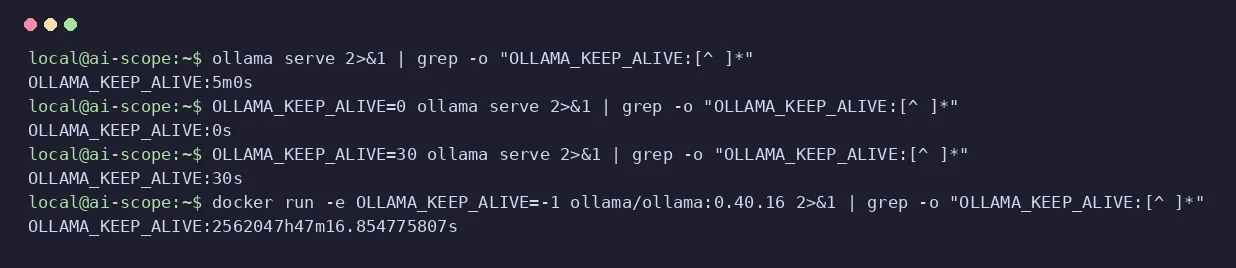
0→0s: the model is unloaded as soon as it answers. It frees memory, and the next request has to load it again.30→30s: a number without a unit is seconds, not minutes. Write30mif you mean half an hour.-1→2562047h47m16.854775807s: any negative value means “never unload”.
The variable sets the default for the whole server. Each request can override it with its own keep_alive field in /api/generate or /api/chat, which takes precedence according to the v0.40.16 documentation; ollama stop unloads a model on the spot, as we showed in our Ollama commands guide.
OLLAMA_NUM_PARALLEL, OLLAMA_MAX_LOADED_MODELS and OLLAMA_MAX_QUEUE
These three decide how many things Ollama does at once, and they all cost memory. In v0.40.16, measured on 19 November 2026, the defaults are 1, 0 and 512:
OLLAMA_NUM_PARALLEL(1): requests each model serves at the same time. According to the v0.40.16 documentation, the memory needed grows withNUM_PARALLEL× context: 4 parallel requests at 8192 tokens of context reserve cache for 32,768 tokens.OLLAMA_MAX_LOADED_MODELS(0 = automatic): the documentation puts the automatic limit at 3 models per GPU, or 3 when running on CPU, as long as they fit in memory.OLLAMA_MAX_QUEUE(512): requests waiting their turn; past that, the server answers with a 503 error.
For a single person chatting at home, the defaults are fine. Raise NUM_PARALLEL if several tools or people share the same server, and do the sums for the context before you do.
OLLAMA_FLASH_ATTENTION and OLLAMA_KV_CACHE_TYPE: less memory for long contexts
OLLAMA_KV_CACHE_TYPE quantizes the context cache: q8_0 uses about half the memory of the default f16, and q4_0 about a quarter, according to the v0.40.16 documentation, which adds that this saving applies when flash attention is enabled. On 19 November 2026, OLLAMA_KV_CACHE_TYPE=q8_0 appeared as is in the startup line. How much each context costs, model by model, is in our guide to context length in Ollama.
OLLAMA_FLASH_ATTENTION shows false by default, which means “not forced”: according to its documentation, v0.40.16 already uses flash attention when the backend and the device support it, and the variable is for forcing it with 1 or blocking it with 0. Here comes the catch we found:
“invalid environment variable, using default”: a bad value
This is the warning v0.40.16 gives when a variable that expects a whole number gets something else. On 18 November 2026, with OLLAMA_NUM_PARALLEL=abc, the server started anyway and logged:
time=2026-11-18T15:53:14.078Z level=WARN source=config.go:265 msg="invalid environment variable, using default" key=OLLAMA_NUM_PARALLEL value=abc default=1On 19 November, with OLLAMA_MAX_LOADED_MODELS=dos, the same message with default=0. The line tells you everything: which variable (key), what you wrote (value) and what it used instead (default). It appears for the variables that expect a whole number: NUM_PARALLEL, MAX_LOADED_MODELS, MAX_QUEUE, CONTEXT_LENGTH, MAX_TRANSFER_STREAMS and GPU_OVERHEAD. By the same code, a 16k in OLLAMA_CONTEXT_LENGTH would fall back to 0, automatic: write 16384.
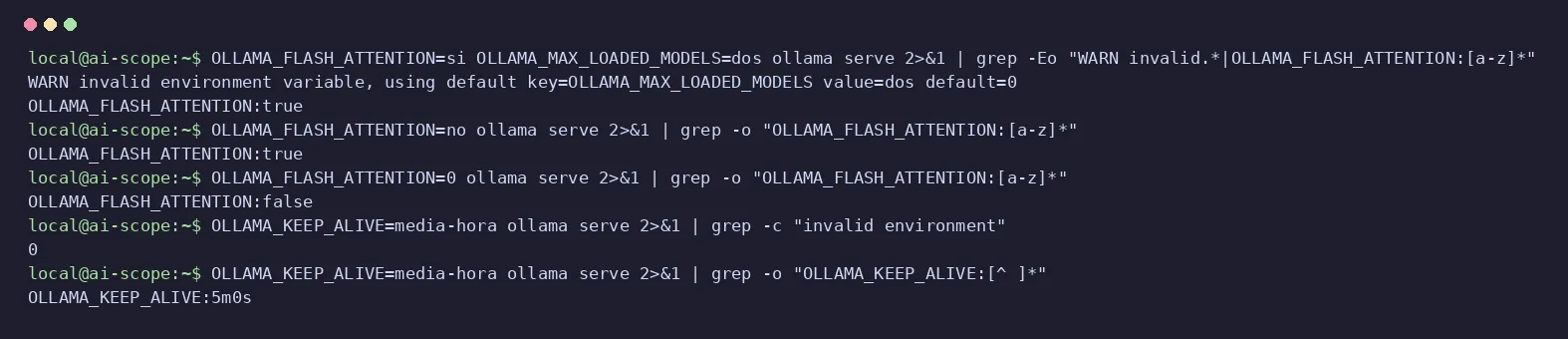
The worrying ones are those that don’t warn. OLLAMA_KEEP_ALIVE=media-hora (Spanish for “half an hour”, which Ollama doesn’t speak) started without a single warning and stayed at 5m0s; the on/off variables read nonsense as true. That’s why the server config line is worth more than any warning: look for your variable there after every change. And if the server won’t start at all, our list of Ollama errors with their exact text picks up where this leaves off.